
Advertiser Analysis shows you how an app is distributing its ad activity, which networks it is running on, which countries and languages it is targeting, which media formats it is using, and how all of that has shifted over time.
This article explains what the tool tracks and how it fits into an ad intelligence workflow.
To start exploring an advertiser's distribution data, see Analyze advertiser spend and creative distribution.
What Advertiser Analysis tracks
Advertiser Analysis is organized around the same app-level view as Creative Analysis. But where Creative Analysis focuses on individual creatives, Advertiser Analysis focuses on the patterns across all of an advertiser's detected ad activity.
The distributions it surfaces, by network, country, language, media type, and resolution, tell you where and how an app is spending its ad effort.
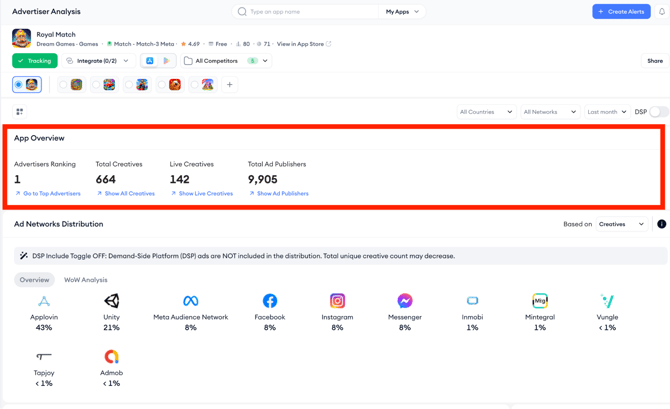
The tool opens with an App Overview showing the app's ranking among advertisers, total creatives detected, live creatives, and total ad publishers.
Below that, a series of distribution sections breaks down ad activity across five dimensions.
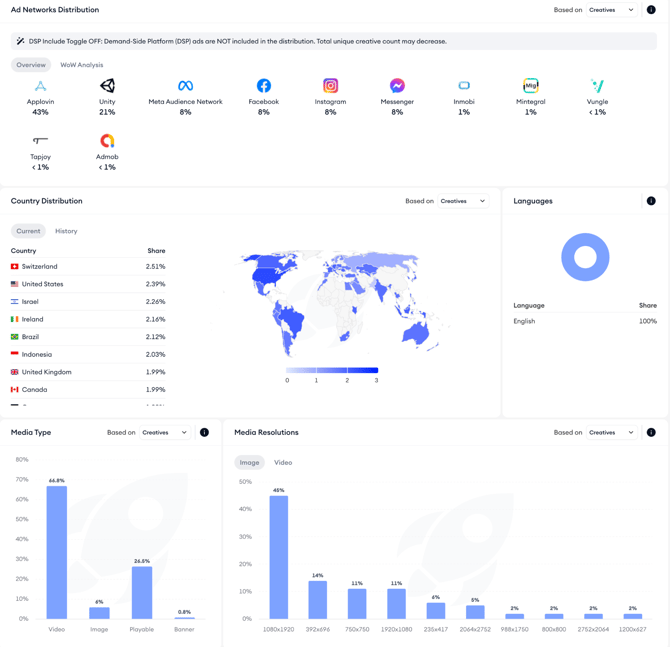
Learn what each of the distribution sections mean in the Analyze advertiser spend and creative distribution article.
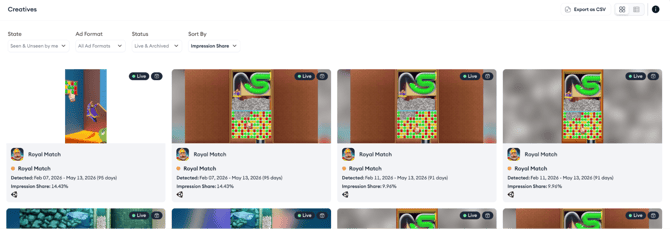
Below the distribution sections, the Creatives section shows the full creative grid for the app (the same view available in Creative Analysis), so you can move directly from distribution insight to individual creative review without switching tools.
Related links
Analyze advertiser spend and creative distribution
Use filters to refine advertiser research
Export and share Advertiser Analysis data
Need more help?
If you have further questions on the process, contact your dedicated Customer Success Manager or contact the support team via live chat.