
This article shows you what the AI Summary in Market Finder covers and how to turn it on.
What the AI Summary covers
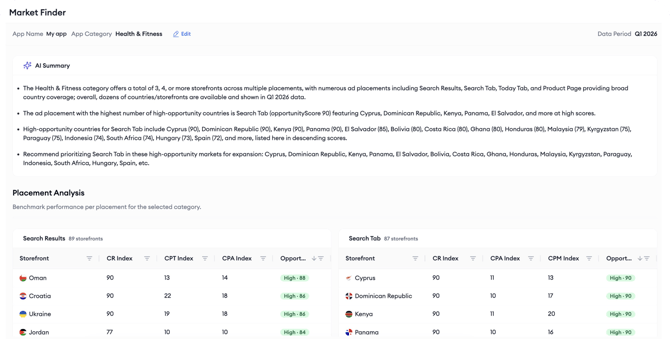
The AI Summary gives you a quick overview of the market opportunities for your selected category. It states how many storefronts and placements are available, identifies the placements with the most High Opportunity markets, lists those markets with their Opportunity Scores, and points out potential markets to consider for expansion.
Use the AI Summary as a starting point before you explore the detailed placement tables.
Before you begin
The AI Summary requires the Generative AI Features consent to be granted on your account. Only account admins can grant it. For details, see Enable Generative AI Features consent.
Instructions
1. Run a Market Finder analysis. The AI Summary section is displayed on the results page.
2. If consent has not been granted yet, the AI Summary section shows a consent prompt instead of the summary.
3. If you are an account admin, grant the consent directly from the AI Summary section, or go to Settings > User Details and grant the Generative AI Features consent.
4. If you are not an account admin, ask an admin on your account to grant the consent.
Related links
How to review Market Finder results
Need more help?
If you have any questions, feel free to reach out to your dedicated Customer Success Manager or contact us through live chat.