
Market Finder helps you discover potential markets for your app by comparing Apple Ads performance across storefronts and ad placements. It uses anonymized, category-level benchmarks to show where apps in your selected category convert well and acquire users at a lower cost, so you can shortlist markets for expansion before you spend there.
You can find Market Finder under Insights Center in the side menu of MobileAction CMP.
Before you begin
Market Finder is included in Enterprise plans. If you see a lock icon next to Market Finder in the side menu, your current plan does not include it; click Market Finder to schedule a demo with our team.
Market Finder benchmarks your selected App Store category, not your individual app. Your app name and description label your analysis; the category determines the benchmarks you see.
What Market Finder shows
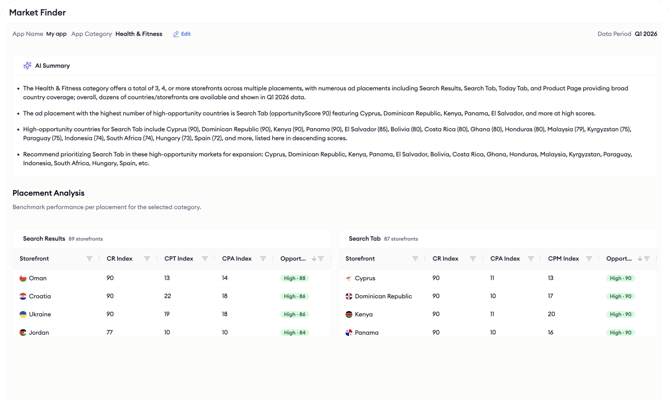
Market Finder analyzes Apple Ads performance for your selected category across the available storefronts and placements. Results are organized into four placements: search results, Search tab, Today tab, and product page. Each placement contains a table of storefronts with benchmark indexes and an Opportunity Score that ranks each market.
The metrics covered are Conversion Rate (CR), Cost per Tap (CPT), Cost per Acquisition (CPA), and Cost per Mille (CPM). All metrics are displayed as normalized indexes on a 10 to 90 scale rather than as raw values. The indexes are calculated within each category and placement, which lets you compare the relative performance of different markets while keeping the underlying data anonymous.
Market Finder combines the CR Index and the CPA Index into an Opportunity Score to highlight markets with a stronger balance of conversion performance and acquisition cost. For details, see Understanding Market Finder metrics and the Opportunity Score.
Data period
Market Finder uses Apple Ads benchmark data from Q1 2026 (January 1 to March 31, 2026). The data period is displayed as an informational label at the top left of the page. The data period is currently fixed and cannot be changed; more data periods are planned to be added over time.
Related links
How to find new markets with Market Finder
How to review Market Finder results
Understanding Market Finder metrics and the Opportunity Score
Need more help?
If you have any questions, feel free to reach out to your dedicated Customer Success Manager or contact us through live chat.