
This article shows you how Market Finder results are organized and how to read the placement tables.
Placement widgets
Your results are organized into four placement widgets: search results, Search tab, Today tab, and product page. Each widget contains a benchmark table where every row is a storefront, and the number of available storefronts is shown next to the widget title.
Storefront availability can vary by category and placement, so each placement may contain a different number of storefronts.
Table columns
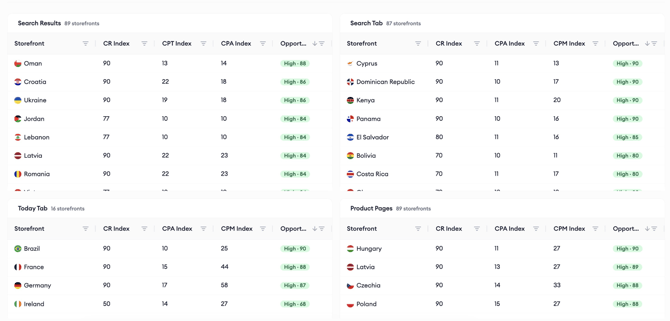
The search results table shows the CR Index, CPT Index, CPA Index, and Opportunity Score for each storefront.
The Search tab, Today tab, and product page tables show the CR Index, CPA Index, CPM Index, and Opportunity Score.
For what each index measures, see Understanding Market Finder metrics and the Opportunity Score.
Sorting
All tables are initially sorted from the highest Opportunity Score to the lowest, so the strongest markets for your selected category appear first. You can change the sorting order, and all sortable columns support ascending and descending sorting.
Identify High Opportunity markets
Each storefront's Opportunity Score is labeled High (67 to 90, green), Medium (34 to 66, yellow), or Low (10 to 33, red). A High score indicates that a market combines relatively strong conversion performance with relatively lower acquisition costs compared with the other markets in the same category and placement.
Edit your app informationYour app name and selected category are displayed at the top of the page. To change them, click the Edit icon next to your app information, update the app name, description, or category, and click Save Changes. If you change the category, Market Finder generates a new analysis for the new category.
Related links
Understanding Market Finder metrics and the Opportunity Score
Understanding the AI Summary in Market Finder
Need more help?
If you have any questions, feel free to reach out to your dedicated Customer Success Manager or contact us through live chat.