
Advertiser Analysis opens on an app-level view that combines a summary of the advertiser's overall activity with a full creative grid.
This article explains how to open the tool, read the App Overview, and navigate to the Creatives section.
To understand what the distribution sections between the overview and the creatives mean, see Analyze advertiser spend and creative distribution.
Open Advertiser Analysis
- Open Advertiser Analysis from the Ad Intelligence module in the navigation menu.
- Search for the app you want to analyze using the search bar at the top, or select from My Apps. You can also use the competitor chip row to switch to a competitor's data.
- The App Overview section loads at the top of the page.
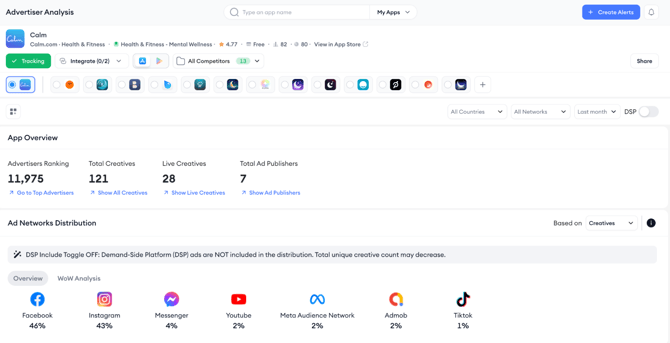
Read the App Overview
The App Overview shows four summary stats:
- Advertisers Ranking (the app's rank among all detected advertisers),
- Total Creatives (all creatives detected within the selected date range and filters),
- Live Creatives (creatives currently active), and
- Total Ad Publishers (the number of publishers serving this app's ads).
Each stat has a quick link that jumps directly to the relevant section or view.
Set the global filters
Check Use filters to refine advertiser research to understand how you can set the filters before reviewing distribution data, set the global filters at the top of the page.
Navigate to the Creatives section
Scroll past the distribution sections to reach the Creatives grid. The grid shows the same creatives and supports the same filters and views (grid and table) as Creative Analysis. Click any creative card to open its detail panel with Creative Details, Copy Analysis, and Top Ad Publishers. Learn more about the creatives section here.
Related links
Analyze advertiser spend and creative distribution
Use filters to refine advertiser research
Export and share Advertiser Analysis data
Need more help?
If you have further questions on the process, contact your dedicated Customer Success Manager or contact the support team via live chat.