
Creative Collections is a tool in the Ad Intelligence module of the MobileAction platform. It lets you save and group ad creatives into named lists so you can reference and compare them over time without returning to the original search.
This article explains what Creative Collections stores and how it fits into an ad intelligence workflow.
To start creating collections, see Create and manage Creative Collections.
What Creative Collections stores
Each Creative Collection holds a set of ad creatives you have saved from across Ad Intelligence, from Creative Analysis, Advertiser Analysis, or Ad Publisher Analysis.
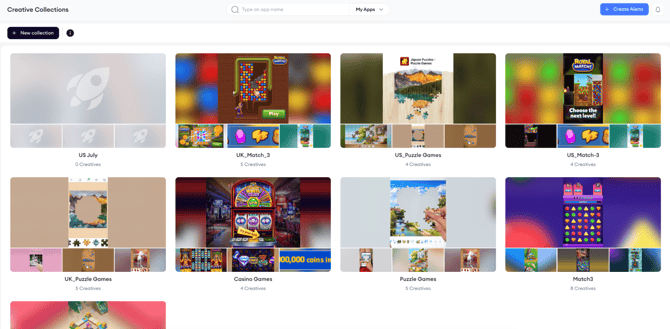
Collections are named and can hold any number of creatives. Each creative card in a collection shows the same information as in the source view: the advertiser's app name, the ad headline, detection dates, duration, Impression Share, and the ad network icons.
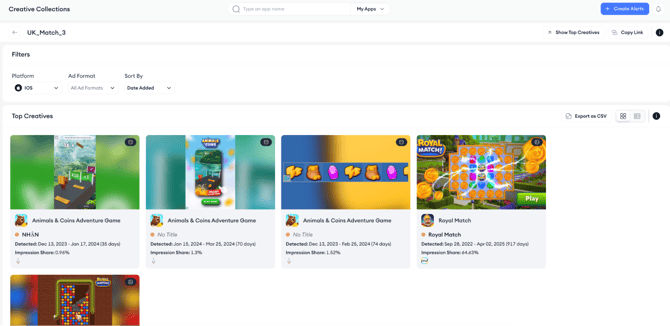
Opening a collection shows the full creative grid for that list.
Three filters apply to the grid: Platform, Ad Format, and Sort By, with Date Added as the default sort so the most recently saved creatives appear first.

You can switch between grid view and table view, and export the collection as a CSV.

Each collection also has a Show Top Creatives shortcut that takes you to a filtered view of the highest-performing creatives in that collection. You can copy a shareable link to the collection from the same header.
How Creative Collections fits into a workflow
Creative Collections is most useful as a persistent reference layer for creative research. Instead of rebuilding the same search every time you want to review a set of competitor ads, you save them once and return to the collection as needed.
A common use is building category-specific collections. For example, all video ads running in the US match-3 category, so you can monitor how creative approaches in that space evolve over time without running new searches each session.
Related links
Create and manage Creative Collections
Need more help?
If you have further questions on the process, contact your dedicated Customer Success Manager or contact the support team via live chat.