
Search tab tool gives you a daily snapshot of every app running ads at the top of the App Store Search tab in a given market. Use it to see who is competing for this high-traffic placement on any given day.
Open the daily runner list
- Open Search tab from the Apple Ads Intelligence menu.
- Confirm the country and date selections at the top of the page.
- Browse the runner list, which loads every app detected running Search tab ads on the selected date in the selected market.
What you see in the list
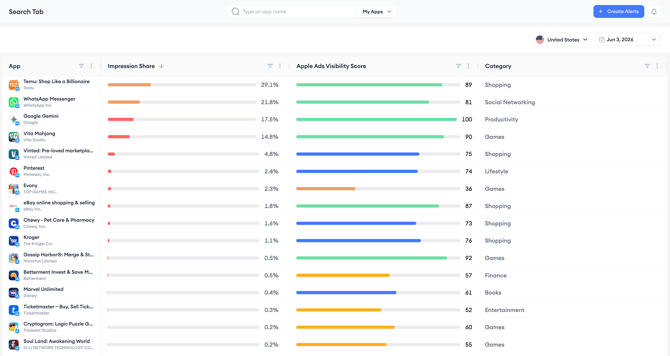
Each row in the runner list shows one app running Search tab ads on the selected date, along with its impression share, Apple Ads Visibility Score, and category. The list is ranked by impression share by default, so the apps capturing the most paid visibility appear at the top.
Related links
Need more help?
If you have further questions or run into any issues, reach out to your dedicated Customer Success Manager or contact the support team via live chat.