
Change History gives you a clear record of what changed, when it changed, and how it was changed across the MobileAction campaign management platform. It is designed for Apple Ads managers, UA teams, and analysts who want transparency across campaign activity and an easy way to review or document actions taken inside the platform.
Instead of relying on memory or manual notes, Change History provides a single place to review edits, creations, duplications, and deletions across supported levels. This makes it easier to audit changes and support collaboration when needed.
How to access Change History
Open the account menu by clicking your account name in the top right corner of the platform. Select Change History from the dropdown.
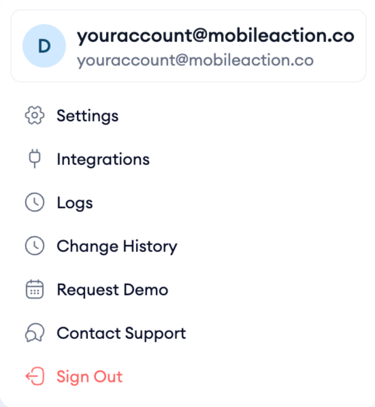
The page loads a table listing all actions recorded across the platform in chronological order.
What the table shows
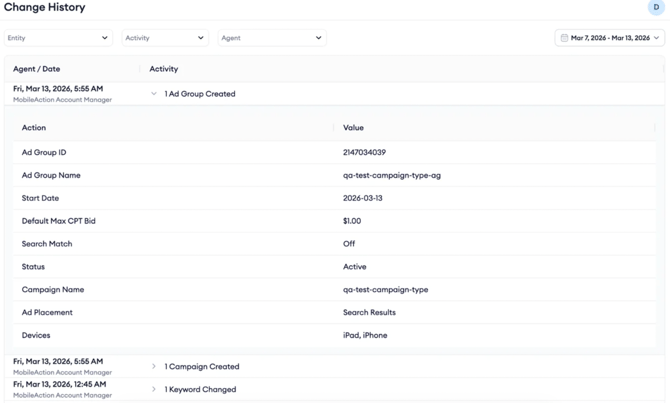
Each row in the table represents a logged activity. The logs capture key actions including Create, Update, Duplicate, and Delete, giving you a chronological view of changes made within your workspace.
Each row shows the date and time the action occurred, the agent who made the change, whether that was a team member acting manually, the MobileAction Ads system, or the MobileAction Account Manager, and the activity that was recorded.
Expanding a row shows the specific fields that were affected along with their new values, such as Ad Group ID, Ad Group Name, Start Date, Default Max CPT Bid, Search Match status, Campaign Name, Ad Placement, and Devices.
Ad scheduling changes are also logged. Whenever an ad schedule is created, updated, duplicated, or edited, including changes made through Actions and Quick Edit, Change History records the action. Expanding an ad scheduling log opens a view that shows the previous and current ad schedule side by side, so you can compare exactly which days and hours changed.
Filter the table
To find a specific type of action, use the three filter dropdowns above the table.
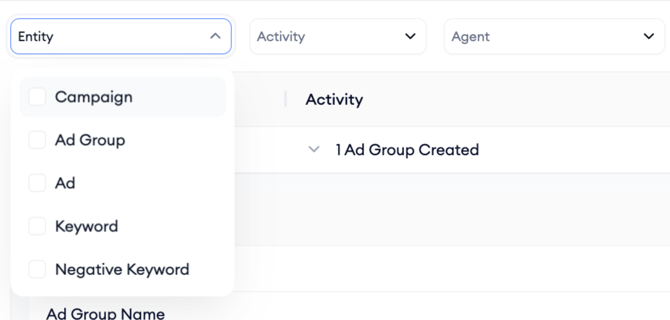
Entity lets you filter by the type of item that was changed. The available entity types are Campaign, Ad Group, Ad, Keyword, Negative Keyword, and Ad Group Name.
Activity lets you filter by the type of action: Create, Duplicate, Update, or Delete.
Agent lets you filter by who made the change:
- Manual (a team member),
- MobileAction Ads System, or
- MobileAction Account Manager.
Note that MobileAction Account Manager is not available as a filtering option.
You can combine all three filters to narrow the table to exactly the activity you are looking for — for example, all keyword updates made by a specific team member within a given date range.
How to use Change History
Change History is built to act as a simple audit log. It records actions taken across supported levels and keeps everything in one place, so nothing gets lost between teammates or sessions. This is particularly useful when multiple people manage the same Apple Ads accounts, or when you need to review historical changes during performance analysis or troubleshooting.
Pro Tip: Use Change History alongside performance views in the platform. Reviewing changes together with metric shifts helps you understand what changed before results moved, instead of guessing after the fact.
Keep in mind!
Change History is for monitoring and documentation, not approvals or rollbacks. It gives you clarity on past actions, but any new updates still happen through the relevant campaign or automation flows.
Related links
- Edit your campaigns in Ads Manager
- Use bulk actions in Ads Manager
- Build scheduled reports in Ads Manager
- Ads Manager overview
Need more help?
If you have further questions, contact your dedicated Customer Success Manager or reach out via live chat.