
The Top Countries by Spend chart in Overview shows how your selected performance metric is distributed across countries in the selected campaign group for the chosen date range. By default, the chart displays Spend. This section helps you quickly identify where your Apple Ads performance is strongest and where there may be untapped opportunity.
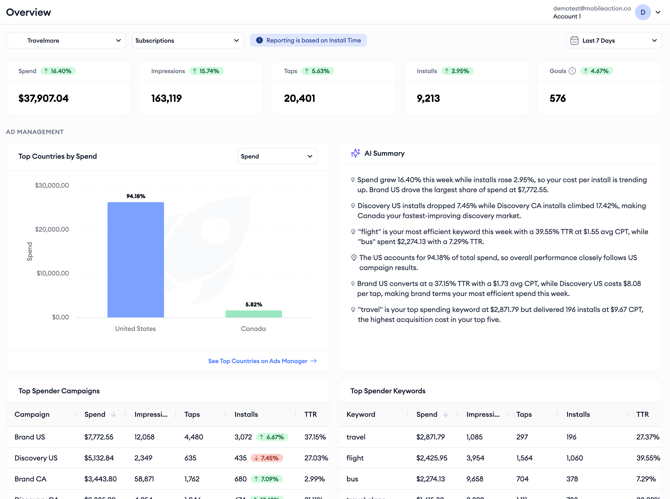
How to read the chart
- The chart displays the top four countries based on the selected metric.
- If more than four countries are available, the remaining countries are grouped into an Others category.
How to change the metric
Use the metric selector above the chart to change which metric is displayed. The available options are Spend, Impressions, Taps, Installs, and Goals. The chart updates immediately when you select a different metric, allowing you to compare geographic distribution across multiple dimensions without leaving the page.
Note: The Goals metric is available only after a Goal has been selected from the Goal filter.
See the full country breakdown
To explore the complete country breakdown, click See Top Countries on Ads Manager. This opens Ads Manager with the same filters already applied, allowing you to view all countries and perform a more detailed analysis.
How to use the data
Identifying high-performing markets: Countries that are generating a large share of installs or taps relative to spend may represent markets where your campaigns are particularly performing well. These are worth understanding more deeply, both in terms of what is driving performance and whether there is room to scale budget.
Reviewing spend distribution: Switching the chart to show spend lets you see where your budget is being consumed geographically. If spend is heavily concentrated in one market but installs are more evenly distributed, it may signal a CPA performance gap worth addressing.
Pro tip: Switch between the Spend and Installs views of the chart and compare the two distributions. A country with a large share of spend but a small share of installs is a candidate for closer review in Ads Manager.
Related links
- Top Spender Campaigns and Keywords in Overview
- Metric Summary in Overview
- Open Overview and set your filters
Need more help?
If you have further questions, contact your dedicated Customer Success Manager or reach out via live chat.