
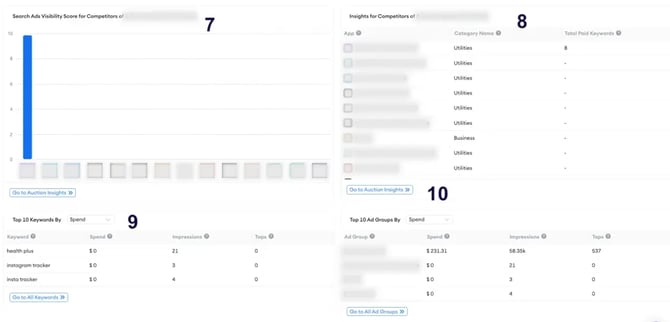
The competitor insights section in Overview shows the Search Ads Visibility Score and keyword activity for the competitors you have selected. This lets you compare your Apple Ads presence against other apps in your category without leaving the Overview dashboard.
What competitor data is shown
For each competitor displayed in the section, you can see:
- Their Search Ads Visibility Score
- The number of paid keywords they are currently targeting
- Their app category
Note: Competitor data is sourced from MobileAction's Search Ads Intelligence data. Visibility scores and keyword counts reflect observed Apple Ads activity and are updated regularly, but may not reflect changes made by competitors in real time.
Search Ads Visibility Score explained
The Search Ads Visibility Score reflects how prominently a competitor appears in Apple Ads across paid keywords. A higher score indicates that the app is running ads against a broad and active set of keywords and is achieving strong visibility in Apple Ads search results.
The score is different from your own Search Ads Performance Grade. Your grade reflects the quality and efficiency of your own campaigns. A competitor's visibility score reflects their breadth of paid presence in the App Store search results. Both are useful signals but they measure different things.
How to compare against your own grade
The competitor insights section displays competitor visibility scores alongside your own Search Ads Performance Grade, so you can see both in the same view. Use this comparison to understand where you stand relative to the competition in terms of paid presence.
A competitor with a significantly higher visibility score and a large keyword count may be capturing search traffic that your campaigns are not reaching. This does not necessarily mean your campaigns are underperforming — a competitor could be spending heavily on low-quality keywords — but it does indicate a difference in coverage worth examining.
How to use competitor insights
Monitor competitor activity over time: A sudden increase in a competitor's keyword count can signal a new campaign push or category expansion. Catching this early gives you the opportunity to respond before it affects your impression share.
Identify keyword coverage gaps: If a competitor is targeting significantly more keywords than you are, it may be worth reviewing whether there are relevant search terms you are not bidding on that they are capturing.
Benchmark your visibility: Use competitor visibility scores as a relative benchmark. If your grade is strong but a key competitor's visibility score is much higher, it may indicate they are investing more aggressively in coverage even if your campaign efficiency is better.
Related links
Need more help?
If you have further questions on the process, contact your dedicated Customer Success Manager or contact the support team via live chat.