
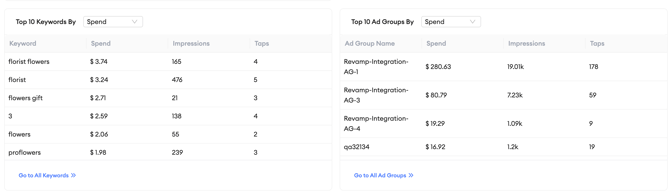
The top keywords and top ad groups sections in Overview show your ten highest-performing keywords and ad groups for the selected app and date range. These sections give you a fast way to identify what is driving performance in your account and where there may be issues worth investigating.
What the sections show
The top keywords section lists your ten keywords with the highest values for the selected metric within the selected date range. Each row shows the keyword alongside its metric value.
The top ad groups section lists your ten ad groups with the highest values for the selected metric within the selected date range. Each row shows the ad group name alongside its metric value.
Both sections show data at the account level across all campaigns for the selected app, not for a single campaign.
How to sort the lists
Both the top keywords and top ad groups sections can be sorted by three metrics:
- Spend: ranks by the amount of budget consumed during the selected period.
- Taps: ranks by the number of user taps generated during the selected period.
- Impressions: ranks by the number of times ads were shown during the selected period.
To change the sort metric, select spend, taps, or impressions from the options above the relevant table. The list updates immediately to show the top ten by the new metric.
How to use the data
Reviewing spend efficiency: Sort by spend to see which keywords and ad groups are consuming the most budget. Cross-reference this with your installs and conversion rate data to evaluate whether that spend is delivering proportionate results. A keyword with very high spend but low installs is a candidate for bid review or pausing.
Identifying top performers to replicate: Sort by taps or impressions to identify which keywords and ad groups are generating the most engagement. If a specific ad group consistently tops the list, examine what it has in common with underperforming groups: targeting, creative, bid level, or keyword match type.
Spotting unexpected entries: If a keyword or ad group appears in the top ten that you do not expect to be there, it may indicate a broad match keyword picking up unintended traffic, a bid that is higher than intended, or an ad group that has drifted from its original targeting intent. Unexpected top entries are worth investigating in the campaign detail view.
Best practice: Use the top keywords list as a quick daily check rather than a deep analysis tool. If the same keywords appear at the top day after day with stable metrics, your account is running consistently. If the composition of the top ten changes suddenly, it is a signal to look more closely at what shifted.
Related links
Need more help?
If you have further questions on the process, contact your dedicated Customer Success Manager or contact the support team via live chat.