
Report By Volume in ASO Report shows how your ranked keywords break down by search volume band over time. Where Report By Ranking tells you how many keywords you are ranking for and at what positions, Report By Volume tells you how much search demand those rankings actually represent.
To understand which keyword pool to use before you start, see Understand Tracked Keywords and All Ranked Keywords.
What you see in Report By Volume
The Volume Graph is a stacked area chart where each band represents a search volume range: 81–100, 61–80, 41–60, 21–40, 6–20, and under 6.
The left axis shows the number of keywords in each band. The black line is your Visibility Score. A growing share of high-volume bands means your rankings are moving toward terms with more search demand.
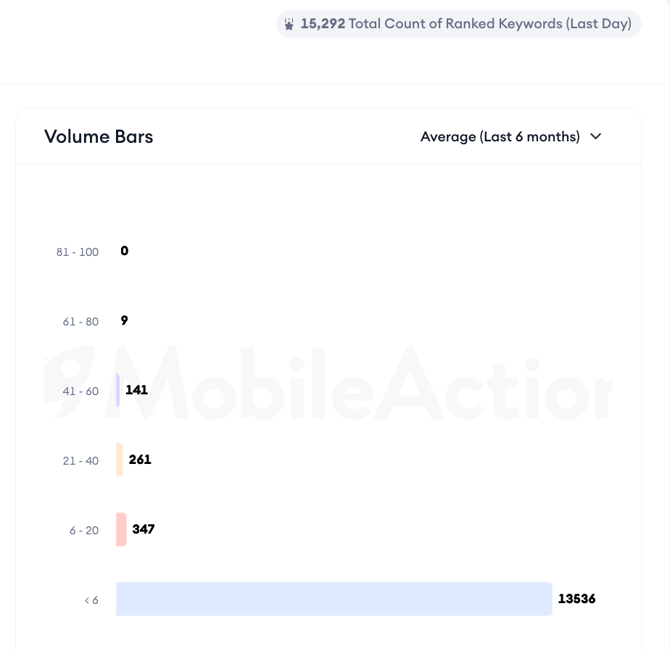
The Volume Bars on the right show a snapshot of your keyword count by volume band at a selected point in time. The Last Day and Average (Last 6 months) options work the same way as in Report By Ranking.
Using the chart controls
The App Updates toggle, date range picker, and Annotations controls work the same way across all reports in ASO Report. See Analyze keyword ranking distribution for a full explanation of each control.
Reading the keyword table
The keyword table below the chart works the same way as in Report by Ranking.
You can set a date, add a Compare date to track changes between two periods, open metric popups for definitions, and use the Columns and Filters panels to adjust the view.
In this report, sorting the table by Volume is particularly useful. Keywords ranked in the 81–100 volume band with a strong ranking position represent your highest-visibility terms. Keywords in the under 6 band that you are spending tracking capacity on may be worth reconsidering.
After you finish
If you see a significant portion of your ranked keywords concentrated in low-volume bands, that is a signal that your metadata or keyword strategy may need broadening.
Consider using Keyword Inspector to find higher-volume terms with a realistic chance of ranking for your app.
Related links
Need more help?
If you have further questions on the process, contact your dedicated Customer Success Manager or contact the support team via live chat.