
Top Creatives is a creative intelligence tool in Ad Intelligence that surfaces the best-performing ad creatives detected across ad networks. It ranks creatives by impression share so you can see which formats and messages are capturing the most paid attention in any market and category.
What Top Creatives shows you
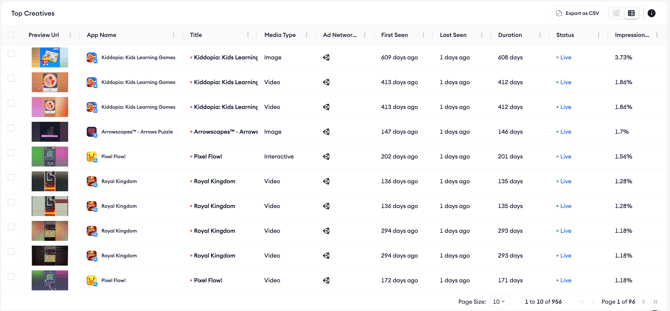
The feed displays live and recently active creatives with a visual preview, live or inactive state label, source app and category, detection window showing first and last seen dates, impression share, and the ad network delivering the creative. You can switch between grid view for visual scanning and list view for more detail per row.
Advanced filtering
Top Creatives includes an Advanced Filters panel with two separate rule sets: one for apps and one for creatives. App rules let you filter by attributes such as app name, keyword, publisher, first seen date, top chart presence, category, or collection. Creative rules let you filter by media format, state, title, dimensions, or duration. Save filter combinations to reload them quickly on future visits.
When to use Top Creatives
- Spot winning creative formats in your category before they become industry standard.
- Study how a competitor’s ad messaging has evolved over time by filtering the feed to their app.
- Identify long-running creatives with high impression share as signals of proven, evergreen formats worth adapting.
- Save creatives to a collection to build a reference library for your own creative team.
Related links
- View the top creatives feed
- Inspect creative details
- Save a creative to a collection
- Filter, sort, and export the creatives feed
Need more help?
If you have further questions or run into any issues, reach out to your dedicated Customer Success Manager or contact the support team via live chat.