
Search Tab tool in Search Ads Intelligence tracks every app running ads at the top of the App Store search page in a given market. The Search tab placement appears before users enter a search query, making it one of the highest-intent placements available through Apple Ads since it reaches users the moment they open the search page.
What Search Tab shows you
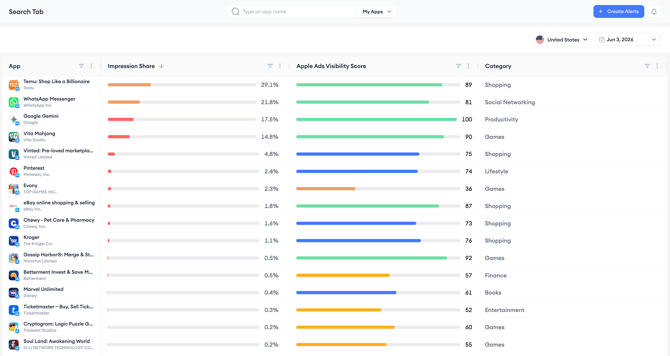
The tool gives you a daily snapshot of every app detected running Search tab ads in the selected market, ranked by impression share. Each row shows the app’s impression share on the placement, its Apple Ads Visibility Score, and its App Store category. The total number of detected runners appears at the bottom of the table.
When to use Search Tab
- Monitor which competitors are investing in the Search tab placement and how their impression share shifts day over day.
- Identify apps with high impression share on the Search tab but a lower overall Visibility Score, which can signal a focused investment in this specific placement.
- Track how the runner list changes around seasonal moments, product launches, or campaign windows.
- Use category filtering to narrow the list to your direct competitive set and see who is dominating the placement in your space.
Related links
- View daily Search tab ad runners
- Read the performance metrics
- Filter and sort the runner list
- Set the region and date
Need more help?
If you have further questions or run into any issues, reach out to your dedicated Customer Success Manager or contact the support team via live chat.