
AI Smart Bidding helps Apple Ads campaign managers keep keyword bids aligned with their campaign goals. Instead of checking and adjusting bids keyword by keyword, you choose a target strategy, enter your target value, and manage the setup from one page.
AI Smart Bidding can be used for both performance optimization and brand protection. You can optimize toward CPI, CPA, cost per goal, ROAS, or impression share depending on what matters most for the selected campaign or ad group.
AI Smart Bidding can be applied to either single or multiple campaigns and ad groups, and it supports simultaneous optimization across multiple countries. The tool is designed to minimize side effects; it ensures that any bid adjustments made are carefully calculated to enhance campaign performance without disrupting overall traffic flow.
AI Smart Bidding setups are listed in one table so you can review what’s running, filter by strategy, and make changes without switching between pages.
Before you begin
- To use AI Smart Bidding, you need access to AI Smart Bidding in your plan.
- AI Smart Bidding can only be applied to campaigns and ad groups running search results ads.
- Before creating a setup, make sure the selected campaigns or ad groups have enough recent performance data for the strategy you want to use.
What AI Smart Bidding can optimize for
AI Smart Bidding supports the following target strategies:
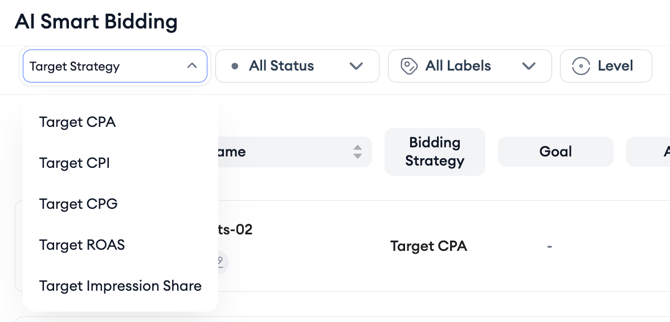
- Target CPI: Helps keep your cost per install aligned with your target.
- Target CPA: Helps keep your cost per acquisition aligned with your target.
- Target CPG: Helps optimize toward the cost of a selected post-install goal.
- Target ROAS: Helps optimize toward return on ad spend using supported ROAS windows, including D1, D7, D14, D30, and D60.
- Target Impression Share: Helps protect brand visibility by optimizing toward a daily Impression Share (First Ad Position) target or range.
Target CPI is useful when you want to optimize install performance based on MMP-attributed install data. If your campaign is focused on acquiring new users at a controlled install cost, AI Smart Bidding adjusts keyword bids to help keep CPI close to your target based on your MMP data.
Target CPA is useful when you want to optimize based on Apple Ads download data. Since this strategy uses Apple’s download data, having your Apple Ads account connected is enough to start using Target CPA without needing MMP data. AI Smart Bidding then adjusts keyword bids to help keep CPA aligned with your target.
Target CPG is useful when a post-install event matters more than the install itself. If your campaign is optimized around a specific goal, such as a registration, purchase, trial start, or another in-app event, AI Smart Bidding adjusts bids based on the cost of that selected goal.
Target ROAS is useful when revenue return is the main success metric. You can optimize toward supported ROAS windows, including D1, D7, D14, D30, and D60. Longer windows, such as D30 and D60, are especially useful when users need more time to show their full revenue value.
Target Impression Share is useful for brand campaigns or ad groups where visibility matters most. On important brand keywords, every impression is either yours or a competitor’s. With this strategy, AI Smart Bidding adjusts keyword bids to help keep your brand visible on the terms you want to protect.
Where AI Smart Bidding applies
AI Smart Bidding can be applied to single or multiple campaigns and ad groups. It also supports optimization across multiple countries.
AI Smart Bidding can only be applied to campaigns and ad groups running search results ads.
How AI Smart Bidding works
When you create an AI Smart Bidding setup, you:
- Enter an AI Smart Bidding name.
- Select a bidding strategy.
- Select the applied level.
- Choose the campaigns or ad groups you want to include.
- Enter the target value for the selected strategy.
- Save the setup.
After the setup is created, AI Smart Bidding adjusts keyword bids based on the selected strategy and target value. You can review all setups in the AI Smart Bidding table, filter by strategy or status, update target values, export data, and check performance or logs.
You can also set minimum and/or maximum bid limits where available. AI Smart Bidding will then optimize the selected keywords within those limits.
Related links
- Create an AI Smart Bidding setup
- Manage AI Smart Bidding setups
- Review AI Smart Bidding logs and performance
- AI Smart Bidding best practices and FAQs
Need more help?
If you have further questions on the process, contact your dedicated Customer Success Manager or contact the support team via live chat.