
The Apps On My Page tab shows every app running ads on a selected app’s product page. Use it to see who is targeting your audience at the moment of conversion, and how aggressively they are competing for those impressions.
Open the Apps On My Page view
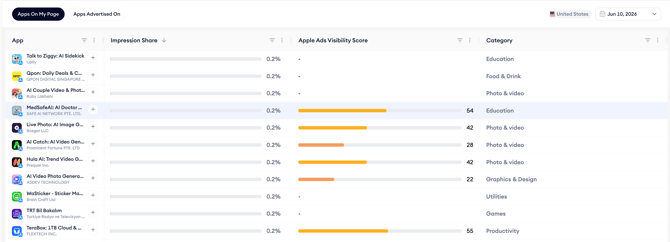
- Open Product Pages from the Apple Ads Intelligence menu.
- Select the app whose product page you want to analyze.
- Make sure the Apps On My Page tab is selected at the top of the page.
- Browse the list of apps detected running ads on the selected app’s product page in the selected market and date.
What you see in the list
Each row shows one app running ads on the selected product page, along with its impression share on that placement, its Apple Ads Visibility Score, and its category.
Related links
- View product pages where your app is advertised
- Read the performance metrics
- Filter and sort the app list
- Set the region and date
Need more help?
If you have further questions or run into any issues, reach out to your dedicated Customer Success Manager or contact the support team via live chat.