
Quick Edit lets you update multiple campaigns or ad groups at the same time from the table view, without opening each item individually.
It is available at the Campaigns and Ad Groups layers and is designed for situations where you need to apply the same change, such as a name update, budget adjustment, or targeting change, across several rows at once.
If you need to perform a different type of operation across multiple items, such as pausing, duplicating, or downloading data, see Use bulk actions in Ads Manager.
Open Quick Edit
From the Campaigns or Ad Groups tab in Ads Manager, select the checkboxes next to the rows you want to update.
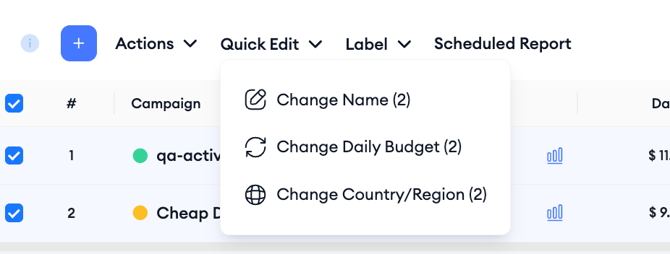
Once at least one row is selected, click the Quick Edit button in the toolbar above the table. A dropdown appears showing the fields you can update for the selected layer.
Quick Edit at the Campaigns level
At the Campaigns layer, Quick Edit supports three fields:
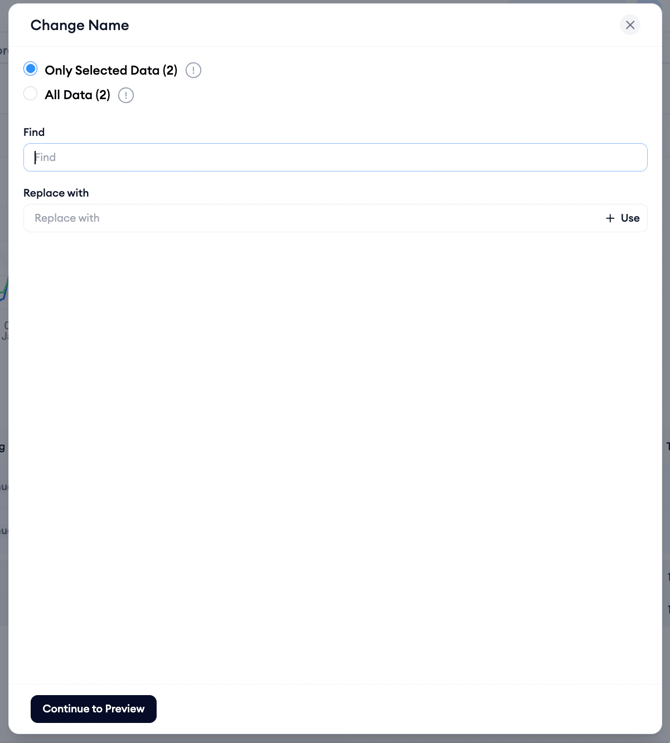
Change Name lets you rename the selected campaigns. You can apply a new name directly, or use a find-and-replace pattern to update parts of existing names across multiple campaigns at once. This selection is useful for renaming campaigns that follow a consistent naming convention without retyping each one.
Change Daily Budget updates the daily spend limit for all selected campaigns. Enter the new budget amount and it applies to every selected campaign simultaneously.
Change Country/Region updates the storefronts targeted by the selected campaigns. You can add or remove countries or regions across all selected campaigns in a single action.
Quick Edit at the Ad Groups level

At the Ad Groups layer, Quick Edit supports a broader set of fields reflecting the additional configuration options available at this level:
Change Name renames the selected ad groups, with the same find-and-replace capability available at the campaign level.
Change CPA Goal updates the CPA target assigned to the selected ad groups.
Change Default Max CPT Bid updates the maximum cost-per-tap bid across all selected ad groups at once. This is one of the most frequently used Quick Edit actions, particularly when adjusting bids in response to performance changes across multiple ad groups.
Change End Date/Time sets or updates the end date and time for the selected ad groups simultaneously.
Change Device updates the device targeting setting - iPhone or iPad - for the selected ad groups.
Change Gender updates the gender targeting setting for the selected ad groups.
Change Customer Type updates the customer type targeting, for example, New Users or Returning Users, across the selected ad groups.
Change Age Range updates the age targeting setting for the selected ad groups.
Change Ad Scheduling updates the dayparting schedule for the selected ad groups. A scheduling panel opens where you can choose a preset or select the exact days and hours your ads should appear, using an hourly grid for each day of the week. Scheduling is based on the user’s local time zone, and the schedule you set applies to every selected ad group at once.
After applying Quick Edit
Changes made through Quick Edit are applied immediately once you confirm the update. The table refreshes to reflect the new values.
If a change could not be applied to one or more rows, for example, because a field is not editable for a particular item, the platform will indicate which rows were not updated.
Related links
Need more help?
If you have further questions, contact your dedicated Customer Success Manager or reach out via live chat.