
The Organic Download History tab in Download Share lets you select keywords from your download-driving list and compare how their Organic Downloads (%) has changed over time on a single chart.
Use it to spot seasonal patterns, catch declining keywords before they become a problem, and validate whether a metadata or keyword strategy change has had an effect.
To understand what Organic Downloads (%) measures, see About Download Share.
Select keywords to chart
Open Download Share from the ASO Intelligence module and click the Organic Download History tab.
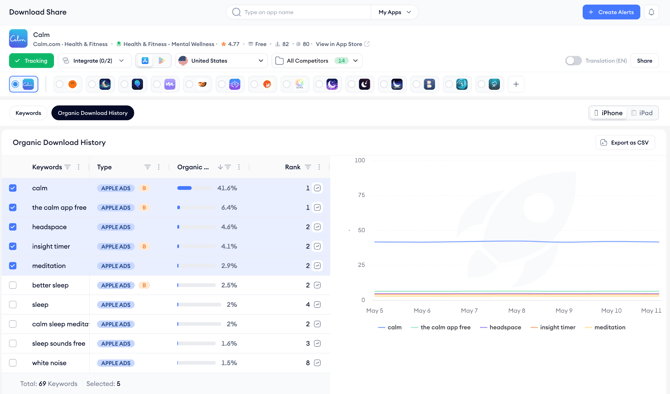
The left panel lists the same keywords shown in the Keywords tab, ranked by their most recent Organic Downloads (%). Each row shows the keyword, its Type tag, its current download share percentage, and its current rank.
Check the box next to any keyword to add it as a line on the chart. You can select up to 5 keywords at once. The total number of selected keywords is shown at the bottom of the panel as Selected: X. Uncheck a keyword to remove its line from the chart.
Read the chart
Each selected keyword appears as a line on the chart. The vertical axis shows Organic Downloads (%) and the horizontal axis shows time.
- A keyword whose line is trending upward is contributing a growing share of your app's organic downloads.
- A flat line indicates a stable but unchanging contribution.
- A declining line warrants investigation; the keyword may be losing ranking, facing more competition, or losing relevance.
Comparing multiple keywords on the same chart is useful for understanding substitution effects. If one keyword's line rises while another's falls over the same period, it may indicate that user search behavior is shifting between terms.
Export the data
Click Export as CSV in the top right of the tab to download the underlying data for all keywords currently listed in the left panel. The export includes the keyword, type, organic download share, and rank for the date range shown in the chart.
After you finish
If a keyword shows a consistent upward trend in download share, consider whether it is already in your Keyword Tracking list. Tracking it in the ASO Report lets you correlate the download share trend with ranking movement and see whether the growth is organic or driven by a ranking improvement.
If a keyword shows a sudden spike followed by a drop, cross-reference that period against any metadata changes or app updates in the ASO Report to understand what triggered the movement.
Related links
Need more help?
If you have further questions on the process, contact your dedicated Customer Success Manager or contact the support team via live chat.