
This tool helps you compare apps, review publisher activity, and decide which app you want to analyze in more detail.
Sort and compare apps
You can sort and compare apps in Publisher Profile.
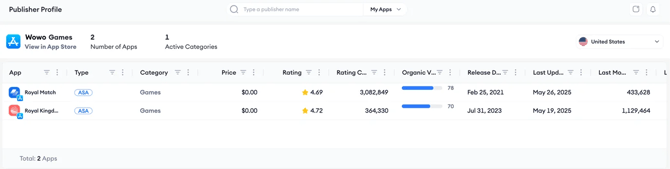
This tool helps you review which apps appear stronger, which apps were updated more recently, and how the publisher’s app portfolio is performing overall.
For example, you can compare apps by rating, rating count, Organic Visibility Score, update activity, or last month’s estimated downloads.
Use Publisher Profile for competitor research
When researching a competitor, use Publisher Profile to review all apps from that publisher together.
Doing this can help you understand:
- How many apps the publisher has
- Which categories the publisher is active in
- Which apps appear to have stronger performance signals
- Which apps were released or updated more recently
Use Publisher Profile for your own portfolio
You can also use Publisher Profile to review your own apps.
This helps you compare your apps in one place and understand which titles may need closer review in App Profile.
Related links
- About Publisher Profile
- Get a complete overview of any app with App Profile
- Guide to Publisher Analysis
Need more help?
If you have further questions on the process, contact your dedicated Customer Success Manager or contact the support team via live chat!