
What the Featured Apps tool shows changes based on the filters you apply.
You can use the tool to review featured apps in different stores, browse featured content by day, and switch between global and country-level views.
Change the Featured Apps view
At the top of the page, you can change the Featured Apps view by using the available filters. Let’s take a look at what the filters are.
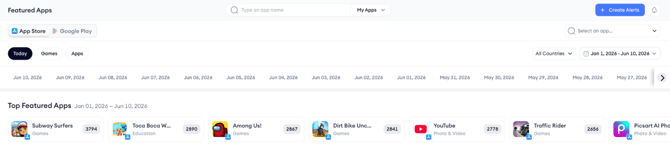
Browse by date
Use the date selector carousel to browse featured content by day.
This filter helps you review featured apps for a specific date.
Choose a platform
Use the platform switch to choose between:
- App Store
- Google Play Store
This filter changes the store view on the page.
Filter by app type
In the App Store, you can filter the page by:
- Today
- Games
- Apps
Note: You can use Featured Apps for games and apps separately, or together in one view in the Today tab.
In the Google Play Store, you can filter the page by:
- Apps
- Games
- Family
Choose countries
Use the country selector to choose all countries or one country. The page layout changes depending on the country selection.
View featured apps across all countriesWhen “All Countries” is selected, the dashboard expands to show a country-by-country breakdown of featured placements.
This view allows you to review global App Store or Google Play Store activity in one scrollable view. Use it when you want to compare featured placements across different regions.
View featured apps for a selected country
If you select a single country, the page focuses only on that region’s features for the selected date.
Use this view when you want to review featured placements in one specific market.
Understand the main sections on the pageWhen viewing all countries, the page shows localized features grouped by region.
Top Featured Apps
Top Featured Apps highlights the most frequently featured apps during the selected time range.
Use this section to quickly identify apps with strong featured visibility.
Daily Feature Highlights
Daily Feature Highlights displays editorially chosen apps for that day in each country.
Use this section to review daily featured selections across regions.
Content Blocks per Region
The tool also includes content blocks for featured placements in each region.
These may include:
- App of the Day / Game of the Day
- Editor’s Choice
- Major Update
- New Season
- Curated groups such as Essential Games, What We’re Playing Now, or Unmissable Events
These sections help you understand how apps are being featured in different countries.
Why you might use Featured Apps
You may use Featured Apps to:
- Monitor featured app trends
- Track competitor visibility
- Review the featured activity across countries
- Explore potential opportunities for your own app.
Tips for using Featured Apps
- Use the country filter to switch between global and regional views.
- Set up alerts to be notified when your app or a competitor’s app gets featured.
- Compare feature appearances with performance spikes using other tools like the Visibility Report.
Related links
Need more help?
If you have further questions on the process, contact your dedicated Customer Success Manager or contact the support team via live chat!