
The demographic and device breakdown section in Overview shows how your selected performance metric is distributed across gender and device segments for the chosen date range. This helps you understand which audience segments your campaigns are reaching and where your performance is concentrated.
What the breakdown shows
The breakdown is divided into two parts:
- Gender breakdown: Divides your data into three categories: men, women, and uncategorized. The uncategorized segment represents users whose gender is not available in Apple Ads data.
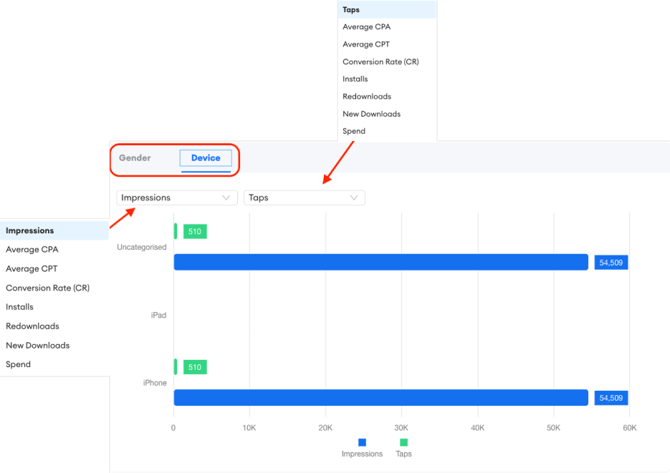
- Device breakdown: Divides your data by device type into iPhone, iPad, and other devices.
Both breakdowns are shown as percentage distributions of the selected metric. For example, if you are viewing installs and 65% appears in the iPhone segment of the device breakdown, it means 65% of installs during the selected period came from iPhone users.
How to change the metric
By default, the breakdown shows the distribution for a pre-selected metric. To change which metric is displayed, click the metric name at the top of the section. The available options match the performance metrics listed on the Overview page: impressions, taps, installs, spend, and others.
The charts update immediately when you select a different metric. You can switch between metrics freely to compare how different segments perform across different dimensions.
How to use the data
The demographic and device breakdown is most useful for two purposes: validating your targeting and identifying audience patterns.
Validating targeting: If your campaigns are set up to target a specific device type or demographic, check that the breakdown reflects that intent. A significant proportion of installs coming from a segment you are not actively targeting may indicate that your targeting settings need review.
Identifying audience patterns: If a particular segment consistently generates a higher conversion rate or lower CPA, it may be worth building campaigns specifically designed for that segment to improve overall efficiency.
Best practice: Compare the breakdown across different metrics rather than looking at just one. A segment that represents a large share of impressions but a small share of installs may indicate a targeting or creative relevance issue for that audience.
Related links
Need more help?
If you have further questions on the process, contact your dedicated Customer Success Manager or contact the support team via live chat.