
Metadata Optimizer is a tool in the MobileAction platform that scores keyword choices for your app's title, subtitle, and description in real time, so you can see which terms are worth including before you publish to the App Store.
If you want to start optimizing right away, go to Score and optimize your app's title and subtitle.
How Metadata Optimizer works
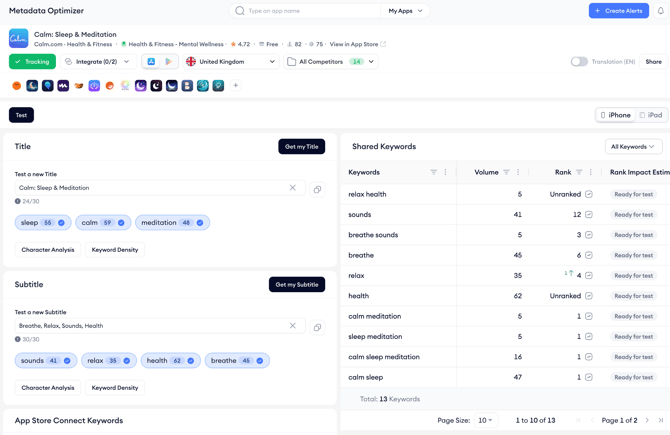
When you open Metadata Optimizer, the tool automatically loads your app's current title, subtitle, and description. You can work with your existing copy or type new variations directly into the fields. The tool scores each keyword as you type, showing its search popularity and difficulty so you can compare options at a glance.
The tool evaluates each keyword you use in your title and subtitle fields and shows whether that term increases or decreases your potential organic visibility. This lets you test variations without making any changes in App Store Connect until you are ready.
The description section works the same way. Because descriptions change more often than titles or subtitles, Metadata Optimizer lets you check how well your new copy aligns with the high-value keywords you are already tracking before you commit to a change.
What the Shared Keywords panel shows
On the right side of the Metadata Optimizer screen, the Shared Keywords panel lists every keyword you are currently tracking in Keyword Tracking, along with each keyword's rank, search popularity, and other metrics. This panel is only available if you have keywords added to Keyword Tracking.
The panel helps you cross-reference your draft copy against your tracked keywords so you can spot gaps (terms you rank for but are not using in your metadata) and redundancies (terms you are already targeting that do not need to appear twice). To use this panel, you need to have tracked keywords first.
If you have not done that yet, go to Add keywords to Keyword Tracking.
When to use Metadata Optimizer
Metadata Optimizer is useful whenever you are planning a metadata update, whether you are preparing for a new app version, responding to ranking changes, or expanding into new categories. Because the tool shows keyword scores in real time and does not require you to publish anything to see results, you can test as many variations as you need before deciding on a final version.
Related links
Need more help?
If you have further questions on the process, contact your dedicated Customer Success Manager or contact the support team via live chat.