
Keyword Translator is a tool in the MobileAction platform that translates your app store keywords into over 20 languages simultaneously, showing each translation alongside its search volume and character count, so you can identify the strongest localized keywords for each market without relying on manual translation tools.
If you want to start translating right away, go to Translate and localize keywords with Keyword Translator.
How Keyword Translator works
You enter one or more keywords in your source language, select the source language, and click Translate.
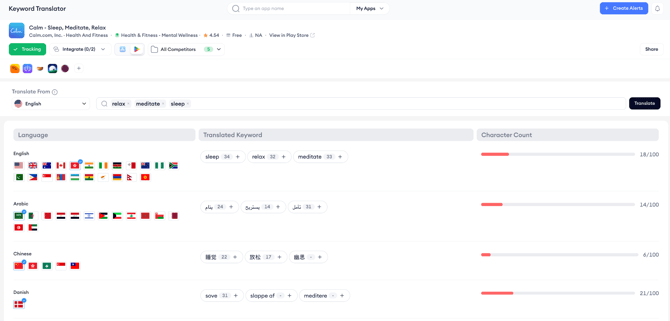
The tool generates keyword suggestions for each available language simultaneously and displays them in a table grouped by language.
Each language row shows the translated keyword suggestions with their search volume scores, the country flags for every storefront that uses that language, and a character count bar showing how much of the 100-character App Store or Google Play Store keyword field limit the translations occupy.
What the results table shows
Language: The target language name, with clickable country flag icons showing every storefront that uses that language. Clicking any flag shows whether that translated keyword is already being tracked in Keyword Tracking for that storefront, a blue checkmark on the flag indicates it is.
Translated Keyword: Each translated keyword appears as a pill with its search volume score. A plus icon on the pill lets you add that keyword directly to Keyword Tracking. A checkmark on the pill means the keyword is already in your Keyword Tracking list.
Character Count: A red progress bar showing the total characters used by your translated keywords for that language out of the 100-character limit. The exact count is shown as a fraction, for example, 18/100 or 21/100. Use this to check whether your keyword set fits within the App Store's field limit before applying it.
Why character count varies by language
Different languages require different numbers of characters to convey the same meaning. Text-heavy languages like Turkish or Thai can use significantly more characters than the source English, while character-based languages like Chinese or Japanese may use far fewer.
For example, an Indonesian translation may use up to 91 out of 100 characters, while the same keywords in Chinese or Japanese may use only 10 to 15.
Always check the Character Count column before adding translated keywords to make sure nothing exceeds the field limit.
When to use Keyword Translator
Keyword Translator is most useful when you are expanding your app into new markets and need a starting point for localized keyword research, or when you want to check whether your existing English keywords have strong equivalents in other languages.
Because each translated keyword shows its search volume, you can prioritize the translations with the highest demand rather than using literal translations that may not match how users in that market actually search.
Related links
Need more help?
If you have further questions on the process, contact your dedicated Customer Success Manager or contact the support team via live chat.