
Download Share is a tool in the ASO Intelligence module of the MobileAction platform. It shows you which keywords are driving your app's organic downloads on any given day and how each keyword's contribution has changed over time.
This article explains what the tool tracks and how it fits into an ASO workflow.
To start using the tool, see Find which keywords drive installs today.
What Download Share tracks
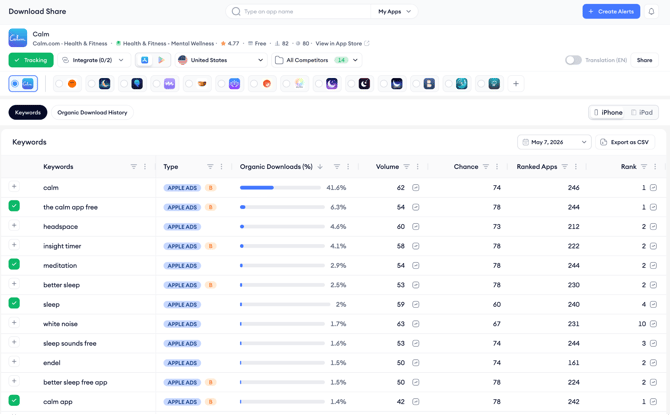
The core metric in Download Share is Organic Downloads (%). For each keyword, this figure represents the percentage of your app's total organic downloads that came from that keyword on the selected date. A keyword with 41% means it was responsible for 41% of all organic downloads your app received that day.
This makes Download Share different from a keyword ranking tool. It does not just show where you rank. It shows which rankings are actually translating into downloads and in what proportion.
A keyword where you rank first but has a low Organic Downloads (%) is driving less download volume than a keyword where you rank second but has a higher share. That distinction is important for prioritization decisions.
The tool is organized into two views.
The Keywords tab shows the full ranked list of download-driving keywords for a selected date, with supporting metrics including search volume, ranking chance, total competing apps, and current rank.
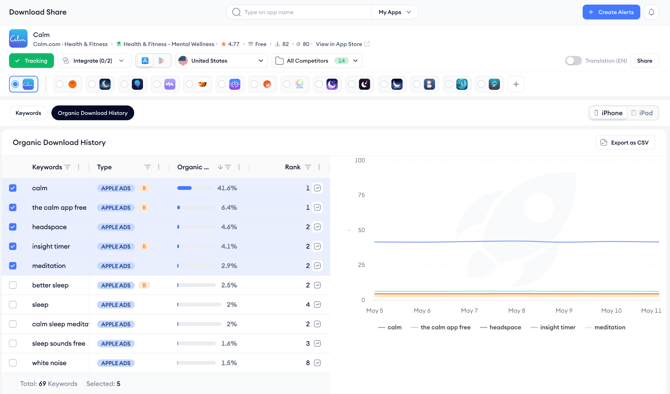
The Organic Download History tab lets you select specific keywords and compare how their download share has moved over time on a single chart.
What the tool does not cover
Download Share shows organic keyword-driven downloads only. It does not show downloads from Browse, paid Apple Ads campaigns, or direct App Store links.
It also does not show absolute download numbers, only the percentage contribution per keyword relative to your app's total organic downloads on that day.
Related links
Find which keywords drive installs today
Track keyword download share over time
Need more help?
If you have further questions on the process, contact your dedicated Customer Success Manager or contact the support team via live chat.