
Compass Trace helps you analyze how organic and paid user acquisition activities may relate to app performance changes.
You can use Trace to compare KPIs across apps, competitors, countries, and storefronts. Trace also helps you review performance movements together with the activities that happened around those changes.
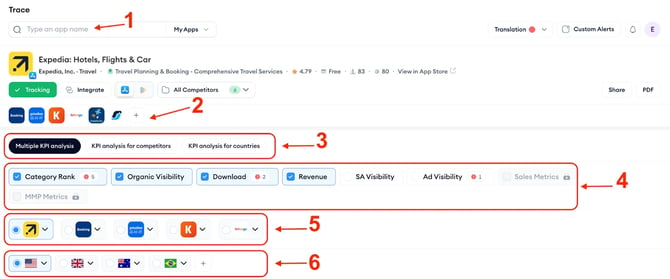
Use Trace when you want to understand questions such as:
- Which KPIs changed for this app during this period?
- How does one KPI compare across my app and competitors?
- Did a KPI change in one country or across multiple storefronts?
- What activities happened around a spike, drop, or unusual KPI movement?
Compass Trace can help you review signals such as category rank, organic visibility, downloads, revenue, paid visibility, app updates, featuring, keyword movement, and other UA activities, depending on your account setup and available data.
Trace does not automatically confirm the cause of a performance change. Instead, it helps you review KPI movement and related activities in one place, so you can investigate changes with more context.
For setup steps, app and competitor selection, KPI selection, storefront selection, and export options, see How to use Compass Trace.
For chart details, spike points, annotations, table view, CSV export, and activity review, see Understand KPI charts and activities in Trace.
Related links
Need more help?
If you have questions about Compass Trace, contact your Customer Success Manager or reach the support team through live chat.