
Revenue Snapshot shows revenue-related metrics from the App Store and Google Play Store. Use this page to understand what each metric means, how far back the data can go, and how current-month data is handled.
Available metrics
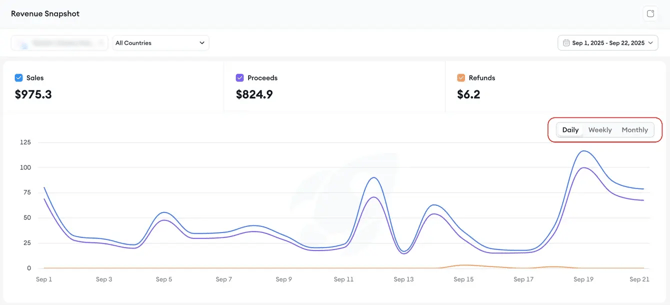
Revenue Snapshot includes the following metrics.
|
Metric |
Store |
What it means |
|
Sales |
App Store |
The total amount generated on the App Store before Apple’s commission or refunds. |
|
Revenue |
Google Play Store |
The total amount generated on Google Play Store before Google’s commission or refunds. |
|
Proceeds |
App Store and Google Play Store |
The net amount after the store’s commission. |
|
Refunds |
App Store and Google Play Store |
The refunded value deducted from Sales or Revenue and Proceeds. |
Data range and currency
Revenue Snapshot displays data in USD.
The dashboard covers the past 12 months. You can select:
- A single day
- A custom date range
The selected date range applies to both the line chart and the table.
Current-month availability
Current-month data availability depends on the store.
|
Store |
Current-month availability |
|
App Store |
Supports the current month, except for today. |
|
Google Play Store |
Does not display the current month due to API limitations. |
Granularity
Granularity controls how your data is grouped in the line chart and table.
You can choose:
- Daily
- Weekly
- Monthly
For example, a weekly granularity can be useful when reviewing multiple countries. It can help you notice unusual changes in proceeds or refunds without the extra detail of daily views.
Related links
- How to use Revenue Snapshot
- About Revenue Snapshot
- How to fix missing apps or data in Revenue Snapshot
- How to integrate your App Store Connect account for Analytics & Performance reports
- How to integrate your Google Play Console account for Analytics & Performance reports
Need more help?
If you have further questions on the process, contact your dedicated Customer Success Manager or contact the support team via live chat!