
Budget Allocation helps you distribute budget across selected campaigns based on performance. Use this page to create your first Budget Allocation group in MobileAction.
Before you begin
Budget Allocation is available once your account is connected to the Apple Ads API.
Create a budget allocation group
- In the left menu, go to Co-pilot and open Budget Allocation.
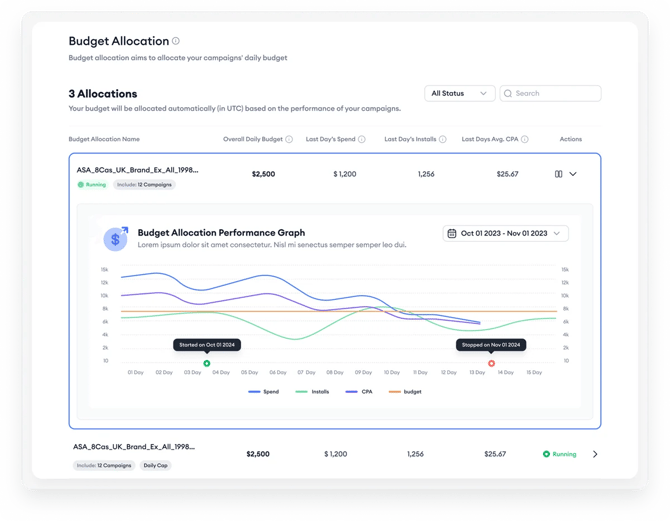
- Click the Create button.
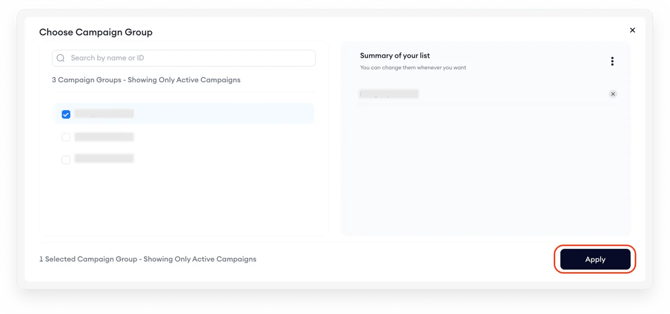
- Choose the campaign group you want to work with, then click Apply.
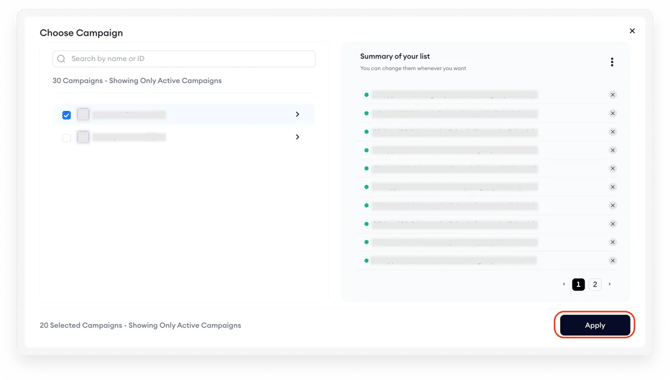
- Choose the campaigns you want to include, then click Apply.
- Enter the daily budget.
- Choose a cap type, daily cap or monthly cap (see the section below).

- Click Create.
After you create the group, Budget Allocation starts distributing your budget according to campaign performance.
Choose a cap type
Daily Cap
When you choose Daily Cap, the daily spend will match the daily budget.
The algorithm may pause some campaigns and reactivate them the next day to help manage and use the full budget without exceeding daily limits.
If you want to set different daily budgets for certain days or date ranges, see Plan budgets with Budget Scheduler.
Monthly Cap
When you choose Monthly Cap, daily spend will average out to approximately the daily budget over the course of a calendar month.
This helps maintain consistent expenditure without exceeding monthly limits.
After you create it
Once your allocation group is live, the tool begins distributing your budget based on campaign performance metrics.
Results can vary depending on your campaign structure, but campaigns typically start producing results close to their set capacity within the first 7 days.
To check how your group is performing, go to the Budget Allocation dashboard. There you can review last day's spend, installs, and average CPA for each group. See Monitor and manage budget allocation groups to learn how to read these metrics and track performance over time.
Related links
Need more help?
If you need help with Budget Allocation, contact your Customer Success Manager or use live chat.