
You can save filter setups (including advanced filters and trend filters) so you can reuse them later without rebuilding from scratch.
Save a filter
When you’re working in the advanced filter builder, you can save your current setup for future use.
Save vs Save As
- Save: Updates an existing saved filter with your latest logic or name changes. Use this when you want to keep the same saved filter and revise it.
- Save As: Creates a new copy based on your current configuration. Use this when you want to branch from an existing setup without overwriting it.
%20copy-png-1.png?width=2859&height=2206&name=searchads-mobileaction-co_dashboard_campaigns%20(5)%20copy-png-1.png)
To learn how to build and edit an advanced filter setup before saving, see Advanced filters: build multi-level filters
Reuse a saved filter
After you save a filter:
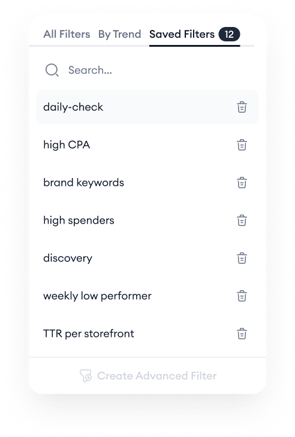
- It appears under Saved Filters in the Filters dropdown menu.
- You can select it from Saved Filters to reapply it without rebuilding.
If you’re using trend filters, remember they are session-based, saving them is how you reuse them later.
To build a trend filter setup before saving, see Trend filters: filter by changes over time.
Delete a saved filter
You can permanently remove a saved filter from Saved Filters.
- In the Filters dropdown, open Saved Filters.
- Click the trash icon next to the saved filter you want to remove.
Keep in mind!
- Saved filters include your selected comparison settings. When you save a filter (basic, trend-based, or advanced), the comparison range you selected is saved with it.
- Some filters or metric options may be unavailable depending on your configuration. Hover over disabled options to see tooltips explaining why.
- Deleting a saved filter cannot be undone. This action only removes the saved version and does not affect filters currently applied in your session.
Related links
- Examples and best practices for advanced filters
- Advanced filters: build multi-level filters
- Trend filters: filter by changes over time
Need more help?
If you’re unsure how to structure your filters or want to confirm they align with your campaign goals, reach out to your Customer Success Manager or start a conversation via live chat from the platform.