
Budget Scheduler lets you set different daily budgets for your Budget Allocation groups on specific days or across date ranges. This helps you plan spend in advance instead of making manual budget changes every day.
You can use it when you want to adjust budgets for weekends, holidays, seasonality, or special campaigns.
Before you begin
Budget Scheduler only works with Daily Cap.
If you want to use Budget Scheduler, choose Daily Cap when you set up the budget allocation group. For setup steps, see Set up a budget allocation group.
Create a schedule
- Open your Budget Allocation group.
- Select Budget Scheduler.
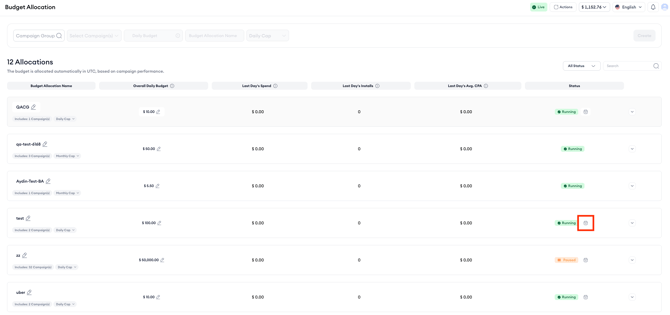
- Pick the days of the week, date ranges, or both where you want a different daily budget.
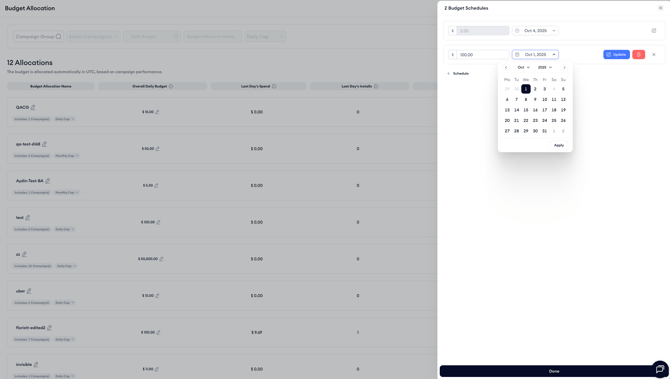
- Enter your preferred daily budget for those selected days.
- Save the schedule.
Once scheduled, the system automatically applies those budget changes on the chosen dates.
Edit or delete a schedule
You can edit or delete schedules at any time.
Any updates apply to future dates only.
How scheduled budgets work with your default daily budget
If no schedule is applied, your default daily budget continues to be used.
Scheduled budgets only apply to the days or date ranges you selected. Outside those scheduled periods, the default daily budget remains in effect.
Related links
Need more help?
If you need help with Budget Allocation, contact your Customer Success Manager or use live chat.