
How to select apps and competitors for impact analysis
Compass Impact helps you review the before-and-after impact of UA activities for a selected app.
Use this article to choose the app, storefront, and competitors you want to analyze in Impact.
Search for an app
Use the search bar to search for any app you want.
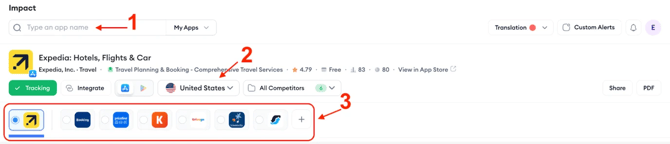
The selected app becomes your main app while using Impact. You can change it at any time.
Switch storefronts
Use the storefront section to switch between storefronts. You can analyze activities across multiple storefronts while using Impact.
Use competitor cohorts
Next to the country dropdown, you can use the All Competitors dropdown to segment competitors into cohorts.
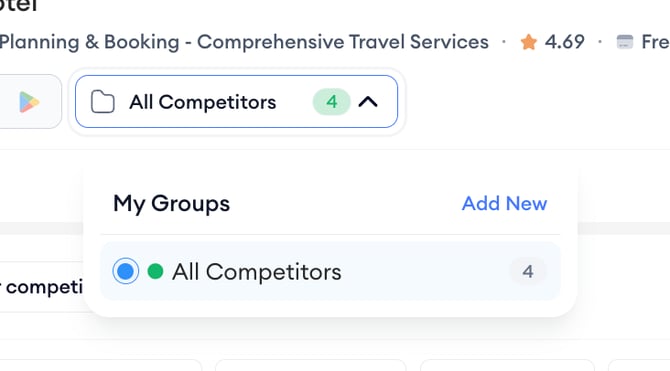
To create a competitor cohort:
- Open All Competitors.
- Select Add New.
Note: Set it here, set it everywhere else. Changes made in the app header apply platform-wide across all tools. This action includes adding, removing competitors, creating cohorts and changing the competitor order.
Review selected competitors
The competitor section lists the competitors you selected. You can use this section to analyze competitors alongside your main app.
Switch between apps
Use the small blue icon next to each app logo to switch between apps.
Add competitors
Use the + button to add new competitors to analyze.
Change competitor order
Drag and drop each app icon to change the competitor order.
Remove competitors
Select the + button in the main navigator and deselect the selected apps.
Related links
Need more help?
If you have questions about setting up Compass Impact, contact your Customer Success Manager or reach the support team through live chat.