
The CPP by Keyword view in Organic CPP Results shows you every app whose custom product page is appearing in organic App Store search for a specific keyword. Use this view to understand which apps are using custom product pages to target a term you care about, and what those pages look like.
To understand what CPP by Keyword tracks and how it relates to the rest of the tool, see About Organic CPP Results.
Before you start
CPP by Keyword is available within Organic CPP Results in the ASO Intelligence.
The view shows data for one storefront and one device type at a time. Set the country and device using the selectors at the top of the page before you run a search.
Search for a keyword
1. Open Organic CPP Results from the ASO Intelligence section in the navigation menu.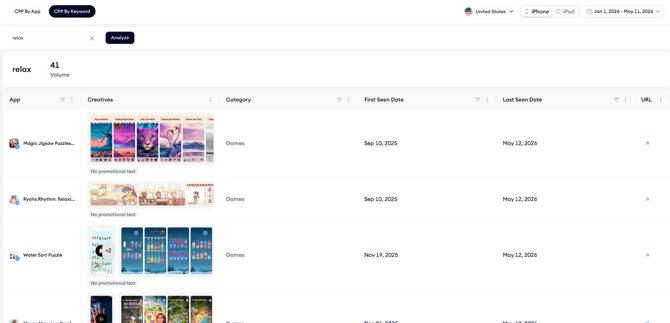
2. Click the CPP by Keyword tab.
3. Type the keyword you want to analyze into the search bar and click Analyze.
The page loads the keyword's search volume score and a table of all apps whose custom product pages have appeared in organic search for that term within the selected date range.
Read the results table
Each row represents one app.
The table shows the app name and icon, the creatives used in the custom product page appearing for that keyword, the app's category, the first date that page appeared for this keyword within the selected period, the last date it was seen, and a link to the live App Store page.

The URL arrow icon works the same way as in CPP by App; clicking it opens the App Store page for that custom product page directly.
If a row shows No promotional text below the creatives preview, the custom product page for that keyword does not include promotional text. This is expected.
Refine your results
Switch the country selector to compare how different storefronts respond to the same keyword.
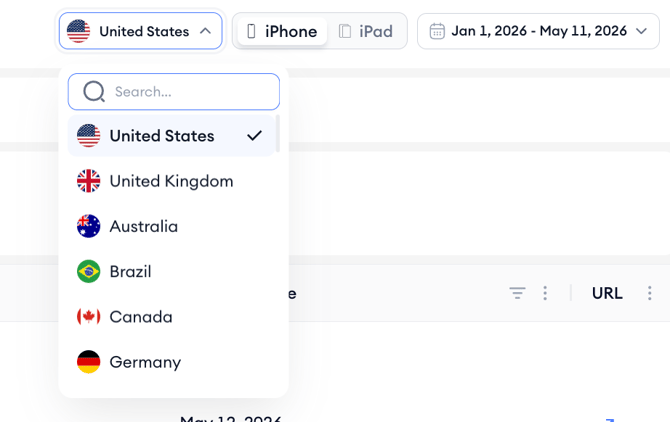
Some apps run different custom product pages by market, so the results can vary significantly between regions.
Toggle between iPhone and iPad to see whether apps are running the same pages across device types or customizing by device.
After you finish
If you found a keyword where competitors are running custom product pages and you are not, that is a gap worth evaluating.
Use the CPP by App view to check whether any of your existing custom product pages are appearing for that term, and consider whether a new or updated page is warranted.
If a competitor's creative approach for a keyword looks worth testing, use that as an input for your own custom product page strategy. To continue your analysis, see Analyze custom product page performance by app.
Related links
Need more help?
If you have further questions on the process, contact your dedicated Customer Success Manager or contact the support team via live chat.