
Search Result/App reveals the full paid keyword list for any app on the App Store. Use it to see which keywords an app bids on, how visible those ads are, and which competitors share the same terms.
Run a search
- Open Search Result/App from the Apple Ads Intel menu.
- Type an app name in the search bar at the top of the page. You can also open the My Apps dropdown to pick from apps you have already tracked.
- Select the app from the suggestions to load its paid keyword data.
What you see in the results
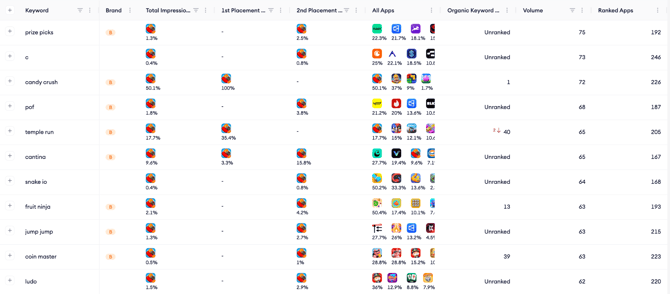
Once an app is loaded, the keyword table lists every term that app bids on in the selected country and date range. Each row includes:
- Keyword: The search term the app is bidding on.
- Brand: Whether the keyword is a brand term.
- Total Impression Share: The app’s aggregate share of paid impressions across available search results placements for that keyword.
- 1st Placement Impression Share: The share of first-placement paid impressions the app captures for that keyword.
- 2nd Placement Impression Share: The share of second-placement paid impressions the app captures for that keyword.
- All Apps: Other apps competing on the same keyword.
- Organic Keyword Rank: Where the app ranks organically for that keyword.
- Volume: The search popularity score for that keyword.
- Ranked Apps: The total number of apps ranking for that keyword.
The total number of paid keywords appears at the bottom of the table.
Note: Not every search shows a second ad, which is common for low-volume keywords, so the number of 1st and 2nd placement ads served for a keyword is not always equal. Because of this, Total Impression Share is not a simple average of the two placement shares.
Related links
- View an app’s active countries
- Compare an app against competitors
- Filter the keyword list
- Set the region and date range
- Export keyword data
Need more help?
If you have further questions or run into any issues, reach out to your dedicated Customer Success Manager or contact the support team via live chat.