
The Localization tool shows you how your app is localized across 89 countries and lets you compare your coverage against competitors, so you can see at a glance where your metadata is complete and where it is missing.
If you need to inspect the localized content for a specific market after reviewing coverage, go to Identify metadata gaps by country.
Before you start
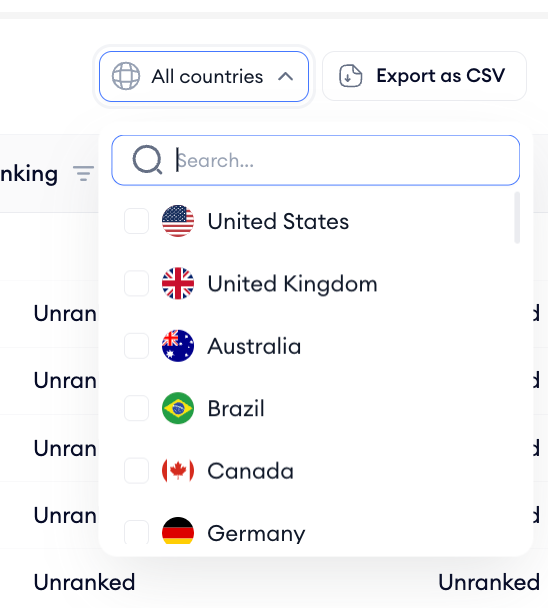
Your own app is selected automatically when you open Localization. You can add competitors to compare their coverage in the same table. The table loads all 89 languages by default, but you can use the language filter to narrow the view to specific markets. CSV export is available at the top right of the table if you need to share or analyze the data offline.
How to use it
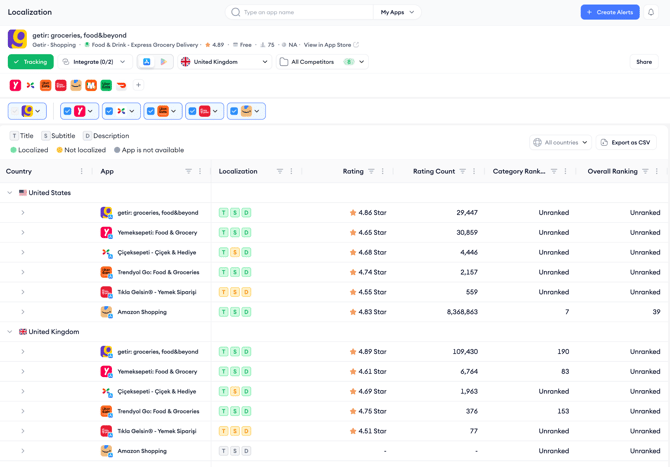
1. Open Localization from the MobileAction platform navigation menu. The table loads with your app selected automatically, grouped by country.
2. Review the T, S, and D badges next to your app for each language group. A green badge means that the field (Title, Subtitle, or Description) is localized for that language. A yellow badge means it is not, and a gray badge means that the app is not available. Use this info to identify which languages have incomplete metadata coverage.
3. Review the Rating, Rating Count, Category Ranking and Overall Ranking columns alongside the localization badges. Markets where your rating or ranking is low while competitors with full localization are ranking well may indicate that localization is a factor worth addressing.


After you finish
Once you have identified markets where your localization is incomplete or weaker than competitors, go to Identify metadata gaps by country to inspect the localized content for those specific markets and extract keywords from competitor metadata.
Related links
Identify metadata gaps by country
Compare localized creatives by market
Score and optimize your app's title and subtitle
Need more help?
If you have further questions on the process, contact your dedicated Customer Success Manager or contact the support team via live chat.