
Search Result/Keyword is a keyword intelligence tool in Search Ads Intelligence that reveals the full competitive picture behind any term in the App Store. Enter a keyword and see which apps are bidding on it through Apple Ads, how competitive the term is, how Total Impression Share is distributed, how visibility differs by placement, and where the opportunities sit.
What Search Result/Keyword shows you
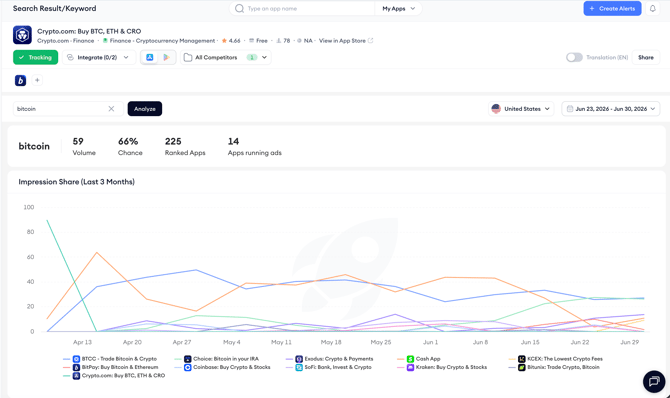
The page displays four headline metrics at the top: volume, ranking chance, total ranked apps, and the number of apps currently running ads. Below that, the Total Impression Share chart shows how paid visibility has shifted between advertisers within the selected date range, and the apps table lists every app competing for the keyword with Total Impression Share, 1st Placement Impression Share, 2nd Placement Impression Share, Apple Ads Visibility Score, organic rank, and total paid keywords.
Keep in mind!
Total Impression Share is not the sum of 1st Placement Impression Share and 2nd Placement Impression Share. It shows the app’s aggregate share of impressions across available search results placements.
When to use Search Result/Keyword
- Identify high-volume keywords with few advertisers as potential gaps worth targeting in your Apple Ads campaigns.
- Check the Total Impression Share chart to see if a competitor has recently gained or lost paid visibility on a keyword you care about.
- Use ranking chance alongside volume to prioritize keywords where you have a realistic shot at ranking organically as well as paid.
- Click through to any app in the apps table to open it in Search Result/App and review its full paid keyword strategy.
Related links
- Analyze a keyword’s competitive landscape
- Read keyword performance metrics
- Track impression share trends over time
- Review the apps ranking for a keyword
- Set the region and date range
Need more help?
If you have further questions or run into any issues, reach out to your dedicated Customer Success Manager or contact the support team via live chat.