
Publisher Profile gives you a quick and organized overview of all apps published by a specific developer.
You can use Publisher Profile to research competitors or track your own portfolio. It helps you understand a publisher’s app footprint without opening each app one by one.
What Publisher Profile shows
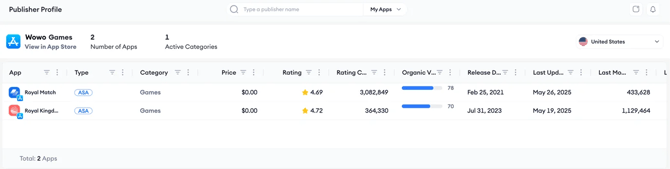
Publisher Profile shows publisher-level and app-level details in one place.
At the publisher level, you can see:
- Publisher name
- A direct link to the publisher’s store listing
- Total number of apps
- Active categories
In the app list, you can see:
- App name
- Category
- Type, such as Apple Ads-enabled
- Price
- User rating
- Rating count
- Organic Visibility Score
- Release date
- Last update date
Open a full app-level view
Publisher Profile gives you a publisher-level snapshot.
When you need more detail about a specific app, click an app row to open its full app-level performance metrics in App Profile.
Related links
Need more help?
If you have further questions on the process, contact your dedicated Customer Success Manager or contact the support team via live chat!