
The cap type determines how Budget Allocation applies the daily budget. You can select a daily cap or a monthly cap when you create an allocation group. Both cap types use the same budget redistribution process.
Compare daily and monthly caps
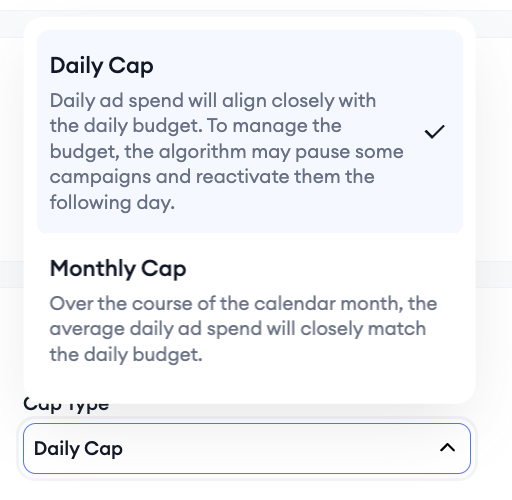
|
Cap type |
How the budget is applied |
Budget Scheduler |
|
Daily cap |
Daily ad spend aligns closely with the daily budget. Budget Allocation may pause campaigns and reactivate them the following day to manage spending. |
Available |
|
Monthly cap |
Over the calendar month, average daily ad spend aligns closely with the daily budget. |
Not available |
Both cap types use the same underlying redistribution algorithm.
For information about how campaign budgets are recalculated, see How Budget Allocation redistributes campaign budgets.
Understand daily caps
With a daily cap, daily ad spend aligns closely with the daily budget configured for the allocation group.
To manage the budget, Budget Allocation may:
- Pause some campaigns.
- Reactivate those campaigns the following day.
Daily-cap allocation groups can use Budget Scheduler to apply different daily budgets on selected future dates.
To create or manage a schedule, see Schedule daily budget changes.
Understand monthly caps
With a monthly cap, average daily ad spend over the calendar month aligns closely with the configured daily budget.
Monthly-cap allocation groups cannot use Budget Scheduler. The Budget Schedule field for these allocation groups shows N/A.
Change the cap type
You can switch between a daily cap and a monthly cap after creating an allocation group, and you can change the cap type while the allocation group is Running or Paused.
When you switch from a daily cap to a monthly cap, Budget Allocation warns you that the existing budget schedule will be reset. Monthly-cap allocation groups do not support scheduling.
For instructions, see Edit, pause, resume, or delete a budget allocation group.
Budget Scheduler availability
Budget Scheduler is available only for daily-cap allocation groups.
The Budget Schedule column can show:
- Active when a schedule exists.
- + Schedule when no schedule exists for a daily-cap allocation group.
- N/A when the allocation group uses a monthly cap.
For more information, see Schedule daily budget changes.
Related links
- Schedule daily budget changes
- Edit, pause, resume, or delete a budget allocation group
- How Budget Allocation redistributes campaign budgets
- Create a budget allocation group
Need more help?
If you have further questions on the process, contact your dedicated Customer Success Manager or contact the support team via live chat.