
Conversion Funnel View helps you understand your app’s acquisition journey from impressions to first-time downloads.
You can use it to review impressions, first-time downloads, and conversion rate together. This helps you see what changed in your app’s performance and where users may be dropping off.
How Conversion Funnel View works
The Conversion Funnel View shows how users move through the funnel, from seeing your app to downloading it for the first time.
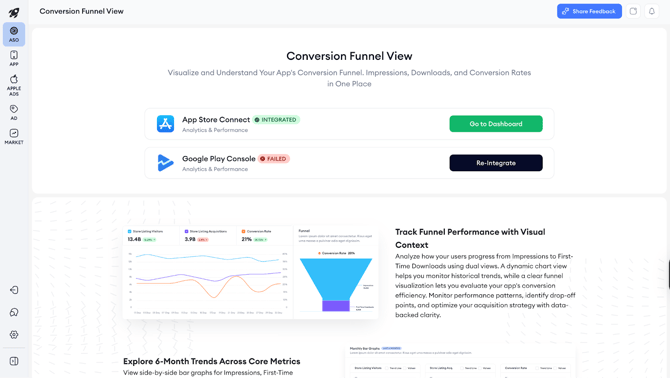
The dashboard brings together three main metrics in the App Store:
- Impressions
- First-time downloads
- Conversion rate
For Google Play Store:
- Store listing visitors
- Store listing acquisitions
- Conversion rate
You can use these metrics to understand whether changes in installs are connected to visibility, conversion performance, or both.
For example, if impressions increase but first-time downloads do not increase at the same level, you may want to review your conversion rate. If impressions drop, the change may be connected to visibility or traffic volume.
When to use Conversion Funnel View
Use Conversion Funnel View when you want to understand what is driving changes in installs.
You can use it to:
- Diagnose a sudden drop in installs
- Measure the impact of a product page update
- Track long-term trends across markets
- Review performance after a launch, creative change, or metadata update
What you can see in Conversion Funnel View
Conversion Funnel View includes a chart, a funnel view, a monthly section, and a table view.
Top chart
The top chart shows impressions, first-time downloads, and conversion rate for your selected date range. This is an aggregate view for the time period you choose. You can hover over the chart to inspect daily values.
Funnel view
The funnel view shows the journey from impressions to conversions for your selected market and time period. Use it to understand how many users moved from seeing your app to downloading it for the first time.
Monthly Bar Graphs
The monthly section shows impressions, first-time downloads, and conversion rate side by side for the last six months. Use this section to spot longer-term trends, such as when impressions increased, when downloads changed, or when conversion rate improved or declined.
The monthly section covers the last six months and does not change based on your initial date selection.
Table view
The table view shows daily metrics.
You can use it to find the exact day when an increase or drop began. You can also sort the table by highest impressions, highest first-time downloads, or highest and lowest conversion rate.
You can export the table as a CSV for reporting, sharing, or deeper analysis.
Data and access requirementsTo access Conversion Funnel View, you need at least one supported Analytics & Performance integration:
- App Store Connect
- Google Play Console
If you open Conversion Funnel View and see a landing page, you need to complete one of these integrations first. After at least one integration is available, you can proceed to the dashboard.
Related links
- How to use Conversion Funnel View
- How to integrate your App Store Connect account for Analytics & Performance reports
- How to integrate your Google Play Console account for Analytics & Performance reports
- Analytics Overview
- Download Report Overview
Need more help?
If you have further questions on the process, contact your dedicated Customer Success Manager or contact the support team via live chat!