
Category Rankings shows your app’s ranking in its primary category across countries and over time.
For example, if your app is in the Health & Fitness category, you can use Category Rankings to understand how it ranks in that category, how its position changes day by day, and how its ranking differs across countries.
You can use Category Rankings to monitor growth, evaluate performance by region, and benchmark your app against selected competitors.
What Category Rankings shows
Category Rankings brings together two views of your app’s category performance:
- Daily Ranking History: shows how your app’s category ranking changes over time.
- Daily Country Ranking: shows where your app ranks across countries on a selected day.
Together, these views help you understand both ranking momentum and country-level performance.
Daily Ranking History
Daily Ranking History shows how your app’s category ranking changes day by day.
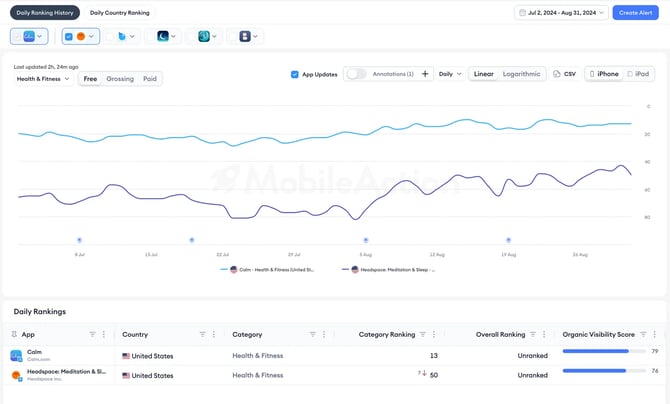
Use this view when you want to monitor ranking movement over time. It can help you review changes around:
- app updates
- paid campaigns
- seasonal changes
At the top of the view, you can choose the country, platform, and ranking set.
Available ranking sets include:
- Free
- Paid
- Grossing
You can also use App Updates and Annotations to add context to the chart. These markers can help you connect ranking changes with feature releases or content changes.
Below the chart, you can compare your app with selected competitors. The table also includes Organic Visibility Score, which gives you another way to review organic momentum beyond rank itself.
Daily Country Ranking
Daily Country Ranking shows where your app stands globally on a selected day.
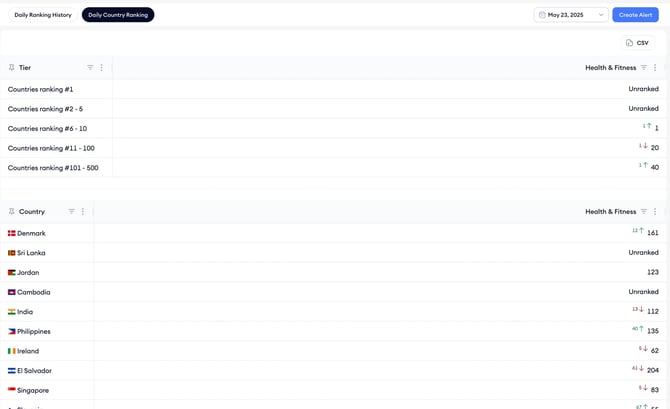
Use this view when you want to understand country-level ranking performance. It can help you see:
- countries where your app ranks well
- countries that may need more attention
- countries where your app may be unranked
When All Countries is selected, Category Rankings groups countries by ranking level:
- ranked #1
- top 5
- top 10
- top 100
- top 500
You can also scroll further to see the exact ranking of your app in each country under the selected category.
When to use Category Rankings
Use Category Rankings when you want to understand how your app’s category presence changes across time and countries.
Category Rankings can help when you are:
- preparing for a launch
- measuring the success of a version update
- monitoring ranking movement after a campaign
- reviewing regional performance
- evaluating localization opportunities
- checking category fit in international stores
- tracking competitor movement after a feature release or pricing change
Related links
Need more help?
If you have further questions on the process, contact your dedicated Customer Success Manager or contact the support team via live chat!