
App Profile gives you a quick overview of any app’s performance. It helps you review important app-level signals in one place before opening more detailed reports.
You can use App Profile to understand how an app is performing across different areas, including visibility, paid user acquisition (if available), user reviews, and geographic distribution.
What App Profile is
App Profile is an overview page for app-level analysis.
Instead of showing only one metric or one report, it brings together multiple performance areas in a single dashboard. This helps you start with a broad view of the app, then choose where to continue your analysis.
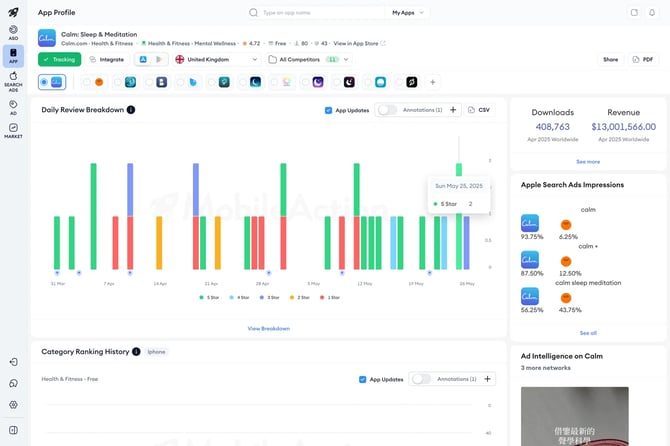
What you can see in App Profile
App Profile can include key insights related to:
- Visibility,
- Paid user acquisition, if available,
- User reviews,
- Geographic distribution
In the App Profile dashboard, you can also see sections and cards such as:
- Daily Review Breakdown
- Category Ranking History
- Organic Visibility Score
- Review Ratings
- Apple Ads Impressions
- Ad Intelligence
These sections help you review different parts of the app’s performance from the same page.
How App Profile connects to other MobileAction tools
App Profile serves as a central hub across your MobileAction toolset.
It brings together sections from:
- Market Intelligence
- Search Ads Intelligence
- Ad Intelligence
- ASO Intelligence
Each section helps you move from high-level metrics to more detailed analysis.
For example, if you want to review paid keyword data, you can use the See all paid keywords button to go to Search Ads Intelligence.
When to use App Profile
Use App Profile when you want to:
- Get a quick overview of an app,
- Review multiple app performance areas from one page,
- Check review-related activity,
- Review category ranking history,
- See paid user acquisition data if available,
- Move from summary insights to detailed intelligence tools.
App Profile is not meant to replace detailed reports, so we recommend using it as a starting point. When you need more detail, continue to the related intelligence module or report.
Related links
Need more help?
If you have further questions on the process, contact your dedicated Customer Success Manager or contact the support team via live chat!