
CPP A/B Testing is a fully automated testing tool designed to help app growth teams compare different custom product pages and ad group configurations within Apple Ads campaigns. It allows you to test multiple variations under controlled conditions, so you can understand which option drives stronger performance without relying on manual setup or guesswork.
Instead of switching pages or ad groups by hand and trying to control timing, traffic, or seasonality yourself, CPP A/B Testing runs these experiments for you. The system isolates external factors such as time-of-day effects and traffic fluctuations, then evaluates results using a consistent statistical framework. This approach makes it easier to move forward with optimization decisions backed by reliable data.
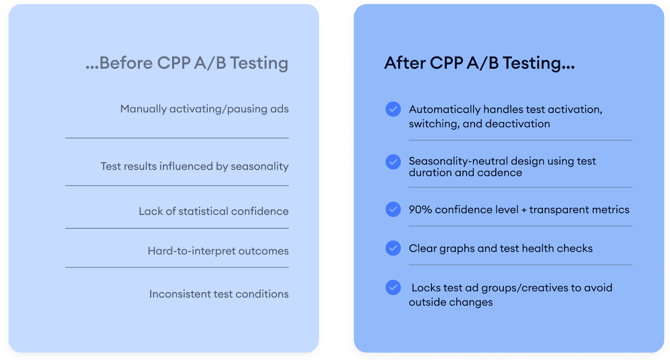
This article introduces why CPP A/B Testing exists, what problems it solves, and what you can do with it. From here, you can continue to articles that explain test types and setup, monitoring results, and troubleshooting.
Key features of CPP A/B Testing
CPP A/B Testing handles the full testing flow from start to finish, covering setup, execution, and analysis in one place. There are 2 methods that can be used to run the tests with sub-options, these methods are Switch and Parallel (See the details here.).
Here are some of the key features of CPP A/B testing:
The setup process is automated. Depending on the selected test method, the platform duplicates ad groups or ads for you and prepares the test structure in the background. You can include between 2 and 4 custom product pages, with the option to include the default product page in the test. Test duration and switching intervals are calculated based on your selected precision level, ranging from 1% to 10% and confidence level, ranging from 80 - 99%.
Each test is designed to reach your desired confidence level. This helps reduce the impact of random variation and keeps results consistent across different traffic patterns. Structured switching or balanced traffic distribution is used to minimize bias caused by time-of-day or seasonal changes.
Tests run in a protected environment. While a test is active, the original ad group is paused so external changes don’t interfere with results. Automations, Smart Bidding, and budget-related actions are temporarily disabled for test entities to keep performance data clean. If you prefer to keep these strategies active, you can choose a test method that supports that setup.
When a test finishes, the system restores your original structure automatically. There’s no need to manually reactivate ad groups or reapply strategies.
You can check all active and completed tests from a dedicated monitoring dashboard. This view shows test details such as method, precision, start and end dates, along with performance metrics, charts, and action logs.
For parallel tests, traffic stabilization helps keep comparisons fair. If one variant starts receiving significantly more traffic than others, it’s temporarily paused so the remaining variants can catch up. This keeps exposure balanced and results easier to trust.
Now that you’ve seen what CPP A/B Testing is and what it’s designed to do, the next step is choosing the right test type and setting it up correctly. You can continue with the article on test types and setup to start your first experiment, or jump to monitoring and troubleshooting articles if you’re already running tests.
What are Switch and Parallel methods on CPP A/B Testing
How to set up CPP A/B tests with the Switch method
How to set up CPP A/B tests with the Parallel method
How to follow progress and read results
Understand how the CPP A/B Testing algorithm works
Common questions about CPP A/B Testing
If you have questions along the way, your Customer Success Manager or the live chat team can help you move forward with confidence.