---
title: How to integrate your App Store Connect account for Analytics & Performance reports
description: You need to integrate your MobileAction account on App Store Connect, and here is how you can successfully do that step by step.
---
[Skip to content](https://helpcenter.mobileaction.co/en/how-to-integrate-your-account-with-mobileaction-on-app-store-connect#main-content)
[](https://www.mobileaction.co/)
- [Website](https://www.mobileaction.co/)
- [Help Center](https://helpcenter.mobileaction.co/en)
Open main navigation
Close main navigation
- [Website](https://www.mobileaction.co/)
- [Help Center](https://helpcenter.mobileaction.co/en)
Advice and answers from the MobileAction Team
- There are no suggestions because the search field is empty.
1. [Help Center](https://helpcenter.mobileaction.co/en?hsLang=en)
2. [Integrations](https://helpcenter.mobileaction.co/en/integrations?hsLang=en)
3. [MobileAction Integrations](https://helpcenter.mobileaction.co/en/integrations?hsLang=en#mobileaction-integrations)
# How to integrate your App Store Connect account for Analytics & Performance reports
This document serves as a complete guide to integrating your App Store Connect account with MobileAction's Analytics & Performance modules. It covers the setup steps, required permissions, and common integration questions. Completing this integration is essential for enabling access to the reporting module and key data pages within the MobileAction platform. These sections allow you to explore detailed metrics such as download trends, source breakdowns, country-level performance, and more, giving you a centralized, visual view of your app’s growth and helping you make informed, data-backed decisions.
### **App Store Connect integration**
Before starting the integration process, it’s important to clarify the roles and permissions required, as well as how to prepare the necessary components. This will ensure a smooth, technically sound integration without access issues or data limitations.
#### **Understanding roles and permissions**
To integrate App Store Connect successfully, you need to understand the difference between **user roles** and **API key access levels,** they are not the same but both are essential for integration.
- The **user role** refers to your permissions within the App Store Connect dashboard.
- The **API key access level** defines what data MobileAction can access.
The integration process must be initiated by a user with the **Account Holder** role in App Store Connect. This is not optional, Apple only allows Account Holders to generate API keys used in third-party integrations.
- The **Account Holder** is the individual who originally enrolled the team in the Apple Developer Program.
- To confirm whether you have this role, go to [*Users and Access*](https://appstoreconnect.apple.com/access/users) in your App Store Connect dashboard.
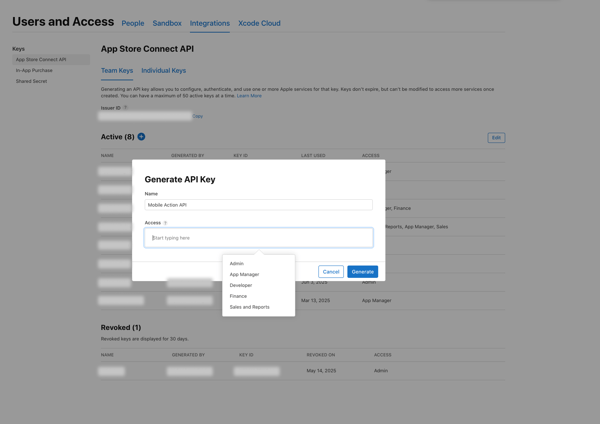
Even if you are the Account Holder, you need to create an API key that has the right level of access to support data collection. This leads us to Admin access. The integration will fail if the **API key** lacks **Admin access,** and vice versa. Both must be correctly set for the integration to function properly.
#### **Why is Admin access required for the API key?**
To ensure a technically complete and error-free integration, the API key must be created with **Admin access**. This is not one of several options, it is currently the only practical and reliable method to enable access to all the data required for analytics and performance tracking. Keys with lower-level access often result in incomplete data or failed API calls. Creating the key with Admin access prevents these issues.
That said, Admin access through the API key does **not** give MobileAction control over your account. Specifically, MobileAction **cannot**:
- Delete your apps
- Manage your users or their roles
- Access legal, tax, or banking information
These restrictions are built into Apple’s API infrastructure. The access MobileAction receives is strictly limited to what is necessary for integration. Granting Admin access poses **no risk** to your app or account security.
#### **Integration preparation checklist**
Before you begin the actual integration in the MobileAction platform, there are a few essential steps to complete within App Store Connect. These steps ensure that you have the correct permissions and credentials in place so that the technical integration proceeds without issues.
This checklist outlines everything you need to prepare ahead of time, from verifying your role to downloading the correct key files. Completing this preparation will help you avoid common errors and speed up the integration process. Please take a few minutes to go through each step carefully.
1- Confirm the integrator is the **Account Holder** in App Store Connect.
2- Navigate to [*Users and Access*](https://appstoreconnect.apple.com/access/users) \> [*Integrations*](https://appstoreconnect.apple.com/access/integrations) \> *Keys \> App Store Connect API* tab and **generate a new API key** with **Admin** access.
.png?width=600&height=424&name=Group%201171275020%20(1).png)
**3- Download the .p8 file** immediately after generating the key. Apple allows this only once. If lost, you must revoke the key and start again.
.png?width=600&height=391&name=Group%201171275019%20(1).png)
4- To proceed with the setup in the MobileAction platform, please gather the following items, which are required inputs for the integration module below. The numbered labels will help you locate each item within App Store Connect.
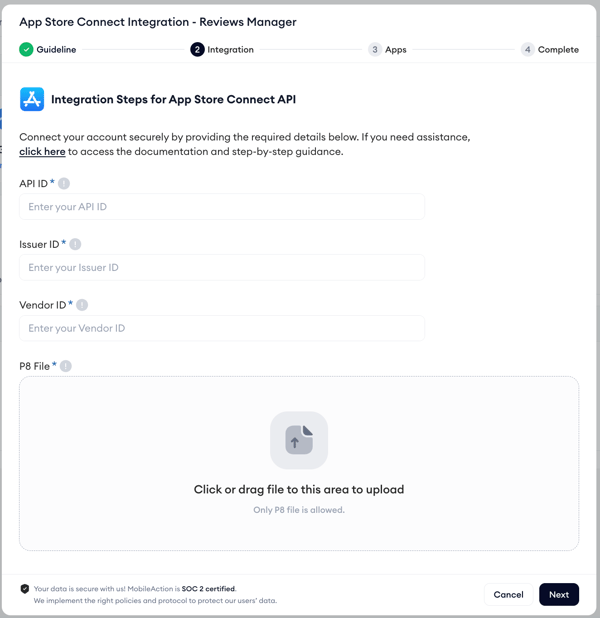
1. **API (Key) ID (1)** - From *Users and Access* \> *Integrations* \> *Keys* tab
2. **Issuer ID (2) -** From *Users and Access* \> *Integrations* \> *Keys* tab, displayed above the key list
3. **Vendor ID** **(3)** - Located in [*Payments and Financial Reports*](https://appstoreconnect.apple.com/itc/payments_and_financial_reports#/), top left
.png?width=600&height=434&name=Group%201171275019%20(2).png)
Having these ready in advance will allow for a fast and efficient integration experience.
### **Integration process in the MobileAction platform**
Please read the following instructions carefully to avoid technical issues and ensure a smooth, fast, and error-free integration process.
**1- Enter required credentials** In the MobileAction integration window, fill in the following fields:
- - **API (Key) ID**
- **Issuer ID**
- **Vendor ID**
- **Upload your .p8 file** (the private key you downloaded from App Store Connect)
**2- App verification**After submitting the credentials, you will see a list of all apps associated with your App Store Connect account. Carefully review the list to confirm the expected apps are visible.

**3- Complete the integration**
Once everything is correctly entered and verified, click to complete the integration. MobileAction will validate the data and confirm a successful connection.
If all information is accurate and access levels are set properly, the integration will complete without issues. For any errors or unexpected behavior, please check the error you get through the Integrations dashboard within MobileAction, revisit the setup steps or reach out to your MobileAction contact for support.
### **Frequently asked questions (FAQ)**
**Q1: What role do I need in App Store Connect to initiate the integration?**You must have the **Account Holder** role to generate API keys and manage the integration.
**Q2: What should I do if I can’t find my .p8 file?**The .p8 file can only be downloaded once. If lost, you must revoke the key in App Store Connect and generate a new one.
**Q3: Where do I find the API ID, Issuer ID, and Vendor ID in App Store Connect?**All can be found under *Users and Access \> Integrations \> Keys*, except Vendor ID, which is located in *Payments and Financial Reports*.
**Q4: Is Admin access safe to give to MobileAction?**Yes. Admin access is scoped and does not permit us to modify your apps, access legal/banking info, or manage users.
**Q5: Can I reuse an existing API key for integration?**Only if you have the .p8 file and the key has the required permissions. If unsure, it’s safer to create a new one.
- [Quick Guide to MobileAction](https://helpcenter.mobileaction.co/en/quick-guide-to-mobileaction?hsLang=en)
- [MobileAction CMP](https://helpcenter.mobileaction.co/en/mobileaction-cmp?hsLang=en#main-content)
- [Apple Ads Integration](https://helpcenter.mobileaction.co/en/mobileaction-cmp?hsLang=en#apple-ads-integration)
- [AI Assistant](https://helpcenter.mobileaction.co/en/mobileaction-cmp?hsLang=en#ai-assistant)
- [Overview](https://helpcenter.mobileaction.co/en/mobileaction-cmp?hsLang=en#overview)
- [Ads Manager](https://helpcenter.mobileaction.co/en/mobileaction-cmp?hsLang=en#ads-manager)
- [Automations](https://helpcenter.mobileaction.co/en/mobileaction-cmp?hsLang=en#automations)
- [CPP A/B Testing](https://helpcenter.mobileaction.co/en/mobileaction-cmp?hsLang=en#cpp-a-b-testing)
- [AI Keyword Planner](https://helpcenter.mobileaction.co/en/mobileaction-cmp?hsLang=en#ai-keyword-planner)
- [AI Smart Bidding](https://helpcenter.mobileaction.co/en/mobileaction-cmp?hsLang=en#ai-smart-bidding)
- [Budget Allocation](https://helpcenter.mobileaction.co/en/mobileaction-cmp?hsLang=en#budget-allocation)
- [Benchmarks](https://helpcenter.mobileaction.co/en/mobileaction-cmp?hsLang=en#benchmarks)
- [Market Finder](https://helpcenter.mobileaction.co/en/mobileaction-cmp?hsLang=en#market-finder)
- [MMP Integration](https://helpcenter.mobileaction.co/en/mobileaction-cmp?hsLang=en#mmp-integration)
- [ASO Intelligence](https://helpcenter.mobileaction.co/en/aso-intelligence?hsLang=en#main-content)
- [Metadata Optimizer](https://helpcenter.mobileaction.co/en/aso-intelligence?hsLang=en#metadata-optimizer)
- [App Update Timeline](https://helpcenter.mobileaction.co/en/aso-intelligence?hsLang=en#app-update-timeline)
- [Creative Monitoring](https://helpcenter.mobileaction.co/en/aso-intelligence?hsLang=en#creative-monitoring)
- [Localization](https://helpcenter.mobileaction.co/en/aso-intelligence?hsLang=en#localization)
- [Keyword Tracking](https://helpcenter.mobileaction.co/en/aso-intelligence?hsLang=en#keyword-tracking)
- [Competitor Keywords](https://helpcenter.mobileaction.co/en/aso-intelligence?hsLang=en#competitor-keywords)
- [Keyword Inspector](https://helpcenter.mobileaction.co/en/aso-intelligence?hsLang=en#keyword-inspector)
- [Keyword Trends](https://helpcenter.mobileaction.co/en/aso-intelligence?hsLang=en#keyword-trends)
- [Keyword Translator](https://helpcenter.mobileaction.co/en/aso-intelligence?hsLang=en#keyword-translator)
- [Organic CPP Results](https://helpcenter.mobileaction.co/en/aso-intelligence?hsLang=en#organic-cpp-results)
- [ASO Report](https://helpcenter.mobileaction.co/en/aso-intelligence?hsLang=en#aso-report)
- [Visibility Report](https://helpcenter.mobileaction.co/en/aso-intelligence?hsLang=en#visibility-report)
- [Download Share](https://helpcenter.mobileaction.co/en/aso-intelligence?hsLang=en#download-share)
- [Store Analytics](https://helpcenter.mobileaction.co/en/store-analytics?hsLang=en#main-content)
- [Revenue Snapshot](https://helpcenter.mobileaction.co/en/store-analytics?hsLang=en#revenue-snapshot)
- [Organic Acquisition Dashboard](https://helpcenter.mobileaction.co/en/store-analytics?hsLang=en#organic-acquisition-dashboard)
- [Download Report](https://helpcenter.mobileaction.co/en/store-analytics?hsLang=en#download-report)
- [Conversion Funnel View](https://helpcenter.mobileaction.co/en/store-analytics?hsLang=en#conversion-funnel-view)
- [Analytics Overview](https://helpcenter.mobileaction.co/en/store-analytics?hsLang=en#analytics-overview)
- [Search Ads Intelligence](https://helpcenter.mobileaction.co/en/search-ads-intelligence?hsLang=en#main-content)
- [Search Result/App](https://helpcenter.mobileaction.co/en/search-ads-intelligence?hsLang=en#search-result-app)
- [Search Result/Keyword](https://helpcenter.mobileaction.co/en/search-ads-intelligence?hsLang=en#search-result-keyword)
- [Search Result/Competitor](https://helpcenter.mobileaction.co/en/search-ads-intelligence?hsLang=en#search-result-competitor)
- [Today Tab](https://helpcenter.mobileaction.co/en/search-ads-intelligence?hsLang=en#today-tab)
- [Search Tab](https://helpcenter.mobileaction.co/en/search-ads-intelligence?hsLang=en#search-tab)
- [Product Pages](https://helpcenter.mobileaction.co/en/search-ads-intelligence?hsLang=en#product-pages)
- [Top Advertisers](https://helpcenter.mobileaction.co/en/search-ads-intelligence?hsLang=en#top-advertisers)
- [CPP by Keyword](https://helpcenter.mobileaction.co/en/search-ads-intelligence?hsLang=en#cpp-by-keyword)
- [CPP by App](https://helpcenter.mobileaction.co/en/search-ads-intelligence?hsLang=en#cpp-by-app)
- [CPP by Category](https://helpcenter.mobileaction.co/en/search-ads-intelligence?hsLang=en#cpp-by-category)
- [CPP on Ad Networks](https://helpcenter.mobileaction.co/en/search-ads-intelligence?hsLang=en#cpp-on-ad-networks)
- [App Intelligence](https://helpcenter.mobileaction.co/en/app-intelligence?hsLang=en#main-content)
- [Compass Explore](https://helpcenter.mobileaction.co/en/app-intelligence?hsLang=en#compass-explore)
- [Compass Trace](https://helpcenter.mobileaction.co/en/app-intelligence?hsLang=en#compass-trace)
- [Compass Impact](https://helpcenter.mobileaction.co/en/app-intelligence?hsLang=en#compass-impact)
- [App Profile](https://helpcenter.mobileaction.co/en/app-intelligence?hsLang=en#app-profile)
- [Publisher Profile](https://helpcenter.mobileaction.co/en/app-intelligence?hsLang=en#publisher-profile)
- [Featured Apps](https://helpcenter.mobileaction.co/en/app-intelligence?hsLang=en#featured-apps)
- [Category Rankings](https://helpcenter.mobileaction.co/en/app-intelligence?hsLang=en#category-rankings)
- [Reviews](https://helpcenter.mobileaction.co/en/app-intelligence?hsLang=en#reviews)
- [AI Review Reply](https://helpcenter.mobileaction.co/en/app-intelligence?hsLang=en#ai-review-reply)
- [Ratings](https://helpcenter.mobileaction.co/en/app-intelligence?hsLang=en#ratings)
- [Similar Apps](https://helpcenter.mobileaction.co/en/app-intelligence?hsLang=en#similar-apps)
- [In-App Events](https://helpcenter.mobileaction.co/en/app-intelligence?hsLang=en#in-app-events)
- [Promotional Content](https://helpcenter.mobileaction.co/en/app-intelligence?hsLang=en#promotional-content)
- [Top Charts](https://helpcenter.mobileaction.co/en/app-intelligence?hsLang=en#top-charts)
- [Biggest Movers](https://helpcenter.mobileaction.co/en/app-intelligence?hsLang=en#biggest-movers)
- [Biggest Losers](https://helpcenter.mobileaction.co/en/app-intelligence?hsLang=en#biggest-losers)
- [Ad Intelligence](https://helpcenter.mobileaction.co/en/ad-intelligence?hsLang=en#main-content)
- [Creative Analysis](https://helpcenter.mobileaction.co/en/ad-intelligence?hsLang=en#creative-analysis)
- [Advertiser Analysis](https://helpcenter.mobileaction.co/en/ad-intelligence?hsLang=en#advertiser-analysis)
- [Ad Publisher Analysis](https://helpcenter.mobileaction.co/en/ad-intelligence?hsLang=en#ad-publisher-analysis)
- [Developer Analysis](https://helpcenter.mobileaction.co/en/ad-intelligence?hsLang=en#developer-analysis)
- [Top Advertisers](https://helpcenter.mobileaction.co/en/ad-intelligence?hsLang=en#top-advertisers)
- [Top Ad Publishers](https://helpcenter.mobileaction.co/en/ad-intelligence?hsLang=en#top-ad-publishers)
- [Top Creatives](https://helpcenter.mobileaction.co/en/ad-intelligence?hsLang=en#top-creatives)
- [Top Developers](https://helpcenter.mobileaction.co/en/ad-intelligence?hsLang=en#top-developers)
- [App Collections](https://helpcenter.mobileaction.co/en/ad-intelligence?hsLang=en#app-collections)
- [Creative Collections](https://helpcenter.mobileaction.co/en/ad-intelligence?hsLang=en#creative-collections)
- [Troubleshooting](https://helpcenter.mobileaction.co/en/troubleshooting?hsLang=en#main-content)
- [MobileAction CMP Troubleshooting](https://helpcenter.mobileaction.co/en/troubleshooting?hsLang=en#mobileaction-cmp-troubleshooting)
- [ASO Intelligence Troubleshooting](https://helpcenter.mobileaction.co/en/troubleshooting?hsLang=en#aso-intelligence-troubleshooting)
- [Search Ads Intelligence Troubleshooting](https://helpcenter.mobileaction.co/en/troubleshooting?hsLang=en#search-ads-intelligence-troubleshooting)
- [Integrations](https://helpcenter.mobileaction.co/en/integrations?hsLang=en#main-content)
- [MobileAction Integrations](https://helpcenter.mobileaction.co/en/integrations?hsLang=en#mobileaction-integrations)
- [SearchAds.com Integrations](https://helpcenter.mobileaction.co/en/integrations?hsLang=en#searchads-com-integrations)
- [SSO Configuration](https://helpcenter.mobileaction.co/en/integrations?hsLang=en#sso-configuration)
- [Settings](https://helpcenter.mobileaction.co/en/settings?hsLang=en#main-content)
- [MobileAction Settings](https://helpcenter.mobileaction.co/en/settings?hsLang=en#mobileaction-settings)
- [SearchAds.com Settings](https://helpcenter.mobileaction.co/en/settings?hsLang=en#searchads-com-settings)
- [Single Sign-On Configuration Guides](https://helpcenter.mobileaction.co/en/settings?hsLang=en#single-sign-on-configuration-guides)
[](https://www.mobileaction.co)
Build app store marketing on AI, automation and expertise
Copyright © 2025, MobileAction